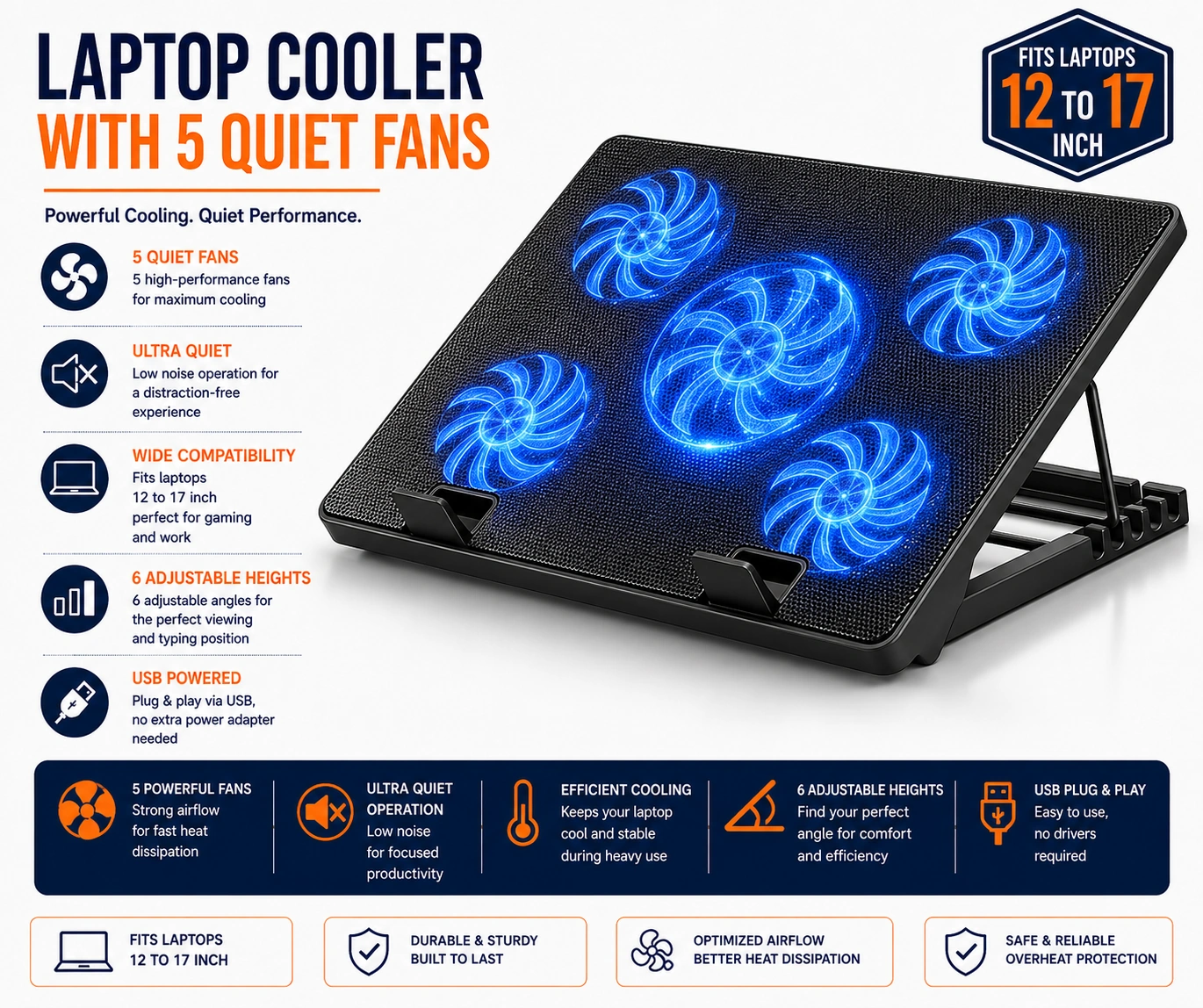
Laptop Cooling Pad, Laptop Cooler with 5 Quiet Fans for 12"-17" Computer PC Notebook Gaming Laptop Fan, Height Adjustable Laptop Cooling Stand Laptop Accessories, Blue
Laptop Cooling Pad with 5 Quiet Fans & Adjustable Stand – Blue
Help improve airflow around your laptop with this practical laptop cooling pad featuring 5 quiet fans. Designed for compatible 12 to 17 inch laptops, the cooler provides active airflow underneath the computer to help support heat dissipation during gaming, office work, study, streaming and everyday use.
The cooling pad also functions as a height-adjustable laptop stand, allowing the laptop position to be raised according to desk setup and viewing preference. Its elevated design creates additional space beneath the computer, helping air circulate more freely around compatible ventilation areas.
Finished with attractive blue detailing, the stand is suitable for gaming desks, home offices, bedrooms and study areas.
5 Integrated Cooling Fans
The cooling pad features five built-in fans designed to move air beneath a compatible laptop and help disperse heat generated during prolonged use.
Quiet Fan Operation
The cooling fans are described as quiet, making the pad suitable for gaming, office work, studying and other environments where reduced fan noise is preferred. The exact decibel rating has not been supplied.
Suitable for 12–17 Inch Laptops
The cooling pad is intended for compatible 12 to 17 inch laptops, notebooks and gaming computers. Check the dimensions and ventilation layout of your device before use.
Height Adjustable Laptop Stand
The adjustable stand allows the laptop angle and elevation to be changed to suit different desk heights, seating positions and personal viewing preferences.
Improved Laptop Ventilation
Raising the laptop above the desk surface creates additional clearance underneath, helping support airflow around compatible bottom ventilation openings.
Supports Heat Dissipation
Active fan airflow helps move warm air away from the laptop base, supporting the computer's own cooling system during longer work, study or gaming sessions.
Ideal for Gaming Laptops
The multi-fan configuration makes the cooling stand a useful accessory for compatible gaming laptops that may generate additional heat during demanding applications and extended play.
PC Notebook Cooling Accessory
Suitable for compatible notebooks and portable computers where additional under-laptop airflow and raised positioning may be beneficial.
Home Office Use
Use the cooling pad at a home workstation to combine laptop elevation with active airflow during video calls, office applications, browsing and everyday computer tasks.
Study & Coursework Use
The stand is suitable for study desks and learning environments where laptops may remain in use for extended periods during research, coursework and online classes.
Comfortable Viewing Position
Adjusting the laptop height can help position the screen more conveniently for suitable desk setups, particularly when working or gaming for longer periods.
Space-Efficient Desk Setup
The integrated cooling pad and stand combine two useful functions in one accessory, helping create a more organised and practical laptop workstation.
Modern Blue Design
The blue finish and detailing provide a modern appearance that complements gaming equipment, computer accessories and contemporary desk setups.
Portable Laptop Accessory
The cooling pad can be repositioned between suitable desks and workspaces, making it useful for home, office, study and gaming environments.
Stable Laptop Support
Place the cooling stand on a firm, dry and level surface and ensure the laptop sits securely before adjusting the height or beginning use.
Keep Fan Openings Clear
Avoid covering the cooling fans or laptop ventilation areas with papers, fabric or other objects, as blocked airflow may reduce cooling effectiveness.
Cable & Electrical Safety
Use the cooling pad with a suitable power connection and keep electrical connectors away from water and excessive moisture. Stop using the product if the cable, connector or housing becomes visibly damaged.
Cleaning & Maintenance
Disconnect the cooling pad before cleaning. Wipe the exterior with a soft, dry cloth and gently remove dust from the fan openings to help maintain suitable airflow.
Storage Guidance
Store the cooling pad in a clean, dry location when not in use and avoid placing heavy objects on the fans, frame or adjustable stand mechanism.
Practical Laptop Cooling Solution
Combining 5 quiet cooling fans, compatibility with 12–17 inch laptops, adjustable height and an elevated ventilation design, this blue laptop cooling pad provides a practical accessory for gaming, work, study and everyday computer use.
Package Information
Package Weight: 950 grams
Package Dimensions: 40.00 × 29.00 × 3.50 cm
Carton Information
Pieces in Carton: 34
Carton Net Weight: 13.50 kg
Carton Gross Weight: 14.50 kg
Carton Dimensions: 57.00 × 41.00 × 31.00 cm
Why Choose STEK?
STEK offers practical computer and desk accessories designed to improve everyday comfort and usability. With an emphasis on effective cooling, adjustable positioning, organised workstation setups and straightforward operation, STEK provides useful solutions for gaming, work, study and home-office environments.
About this item
- Laptop Cooling Pad: Designed to improve airflow beneath compatible laptops, providing a practical cooling solution for gaming, working, studying, streaming, browsing, and other extended laptop-use sessions.
- 5 Quiet Cooling Fans: Features five integrated fans to help circulate air beneath the laptop while maintaining reduced operating noise for a more comfortable gaming, working, or study environment.
- Suitable for 12-17 Inch Laptops: Designed for use with compatible laptops from 12 to 17 inches, making the cooling pad suitable for a wide variety of notebooks, gaming laptops, and everyday computers.
- Gaming Laptop Cooler: Provides additional airflow beneath compatible gaming laptops, making it a useful accessory during longer gaming sessions and other demanding computer activities.
- Height Adjustable Stand: Adjustable positioning allows users to raise and angle the laptop according to personal viewing, typing, gaming, and workspace preferences.
- Laptop Cooling Stand: Combines active fan cooling with an elevated stand design, helping create additional space underneath the laptop for improved airflow and convenient positioning.
- Quiet Everyday Operation: Designed to provide cooling airflow with reduced fan noise, making the stand suitable for offices, bedrooms, study areas, gaming rooms, and shared workspaces.
- Improved Air Circulation: Elevating a compatible laptop above the desk while using five cooling fans helps increase airflow around the underside of the device during regular use.
- Ideal for PC Notebook Use: Suitable for compatible notebook computers and laptops used for office tasks, studying, entertainment, gaming, browsing, and other everyday applications.
- Adjustable Viewing Position: Height adjustment allows users to change the laptop angle according to desk height, seating position, screen viewing preference, and individual workspace requirements.
- Home Office Accessory: A practical addition to home-office desks and workstations where extra laptop cooling and adjustable elevation are useful during longer working sessions.
- Study & Education Use: Suitable for online learning, research, assignments, video calls, and study sessions where a laptop may remain in continuous use for extended periods.
- Gaming Setup Accessory: The combination of multiple cooling fans and adjustable positioning makes the pad a practical addition to compatible desktop gaming and laptop gaming setups.
- Desk-Friendly Design: Designed for use on suitable desks, tables, and work surfaces, helping create a more organised and functional laptop workstation.
- Laptop Accessories Essential: Combines cooling and stand functionality in one practical accessory, reducing the need for separate laptop risers and cooling devices.
- Versatile 12-17 Inch Support: Suitable for a broad range of compatible laptop sizes within the stated 12-17 inch range, offering flexibility across home, office, study, and gaming devices.
- Useful for Extended Laptop Sessions: Additional airflow can be useful during prolonged gaming, working, studying, streaming, and other situations where a compatible laptop is operating for longer periods.
- Portable Workspace Upgrade: Practical for moving between home, office, study, and gaming environments whenever adjustable laptop positioning and additional cooling are required.
- Blue Finish: The blue colour gives the laptop cooler a distinctive appearance that complements modern gaming desks, home offices, study spaces, and computer setups.
- Complete Laptop Cooling Pad Solution: Combining five quiet cooling fans, 12-17 inch laptop compatibility, height-adjustable positioning, elevated stand functionality, improved airflow, and a blue finish , this laptop cooler is ideal for gaming laptops, notebooks, work, study, streaming, home offices, desk setups, and extended everyday computer use .
For custom volume pricing or bulk orders, request a formal quote.
Currently Out of Stock
Direct purchasing is currently disabled for this item. Request a formal quotation below.
| Seller | eBuyerhub Store |
| How to use | 1. Unpack and Inspect the Cooling Pad Carefully remove the blue laptop cooling pad and supplied accessories from the packaging. Inspect the five cooling fans, stand, adjustment mechanism, USB cable and support surfaces for cracks, loose parts or other visible damage before use. 2. Adjust the Stand Height Place the cooling pad on a firm, level desk or table and adjust the stand to a comfortable working angle using the available height settings. Make sure the support mechanism is securely positioned before placing your laptop on top. 3. Position the Laptop Securely Place a compatible 12–17 inch laptop centrally on the cooling stand so the underside ventilation areas receive good airflow. Check that the laptop sits securely and does not obstruct the cooling fans or extend into an unstable position. 4. Connect the USB Power Connect the cooling pad to a suitable USB power source using the supplied cable. Make sure the connection is secure and position the cable so it is not stretched, trapped or likely to be pulled accidentally during use. 5. Operate the 5 Cooling Fans Switch on the cooling system according to the available controls and allow the five quiet fans to circulate air beneath the laptop. Keep the fan grilles and ventilation openings clear so airflow is not restricted during gaming, work or everyday computer use. 6. Maintain a Comfortable Viewing Position Adjust the cooling stand to support a comfortable screen height and typing position where possible. Reposition the laptop or stand if it feels unstable and avoid forcing the height adjustment mechanism beyond its normal range. 7. Use Safely During Operation Keep fingers, cables, papers and loose objects away from the rotating fans and air openings while the cooling pad is operating. Use it on a hard, stable surface rather than soft bedding or cushions that may block airflow and reduce cooling performance. 8. Switch Off, Clean and Store Disconnect the USB power before cleaning or moving the cooling pad. Remove dust from the fan grilles and stand with a soft, dry cloth, inspect the cable and adjustment mechanism regularly, and store the unit in a clean, dry place when not in use. |