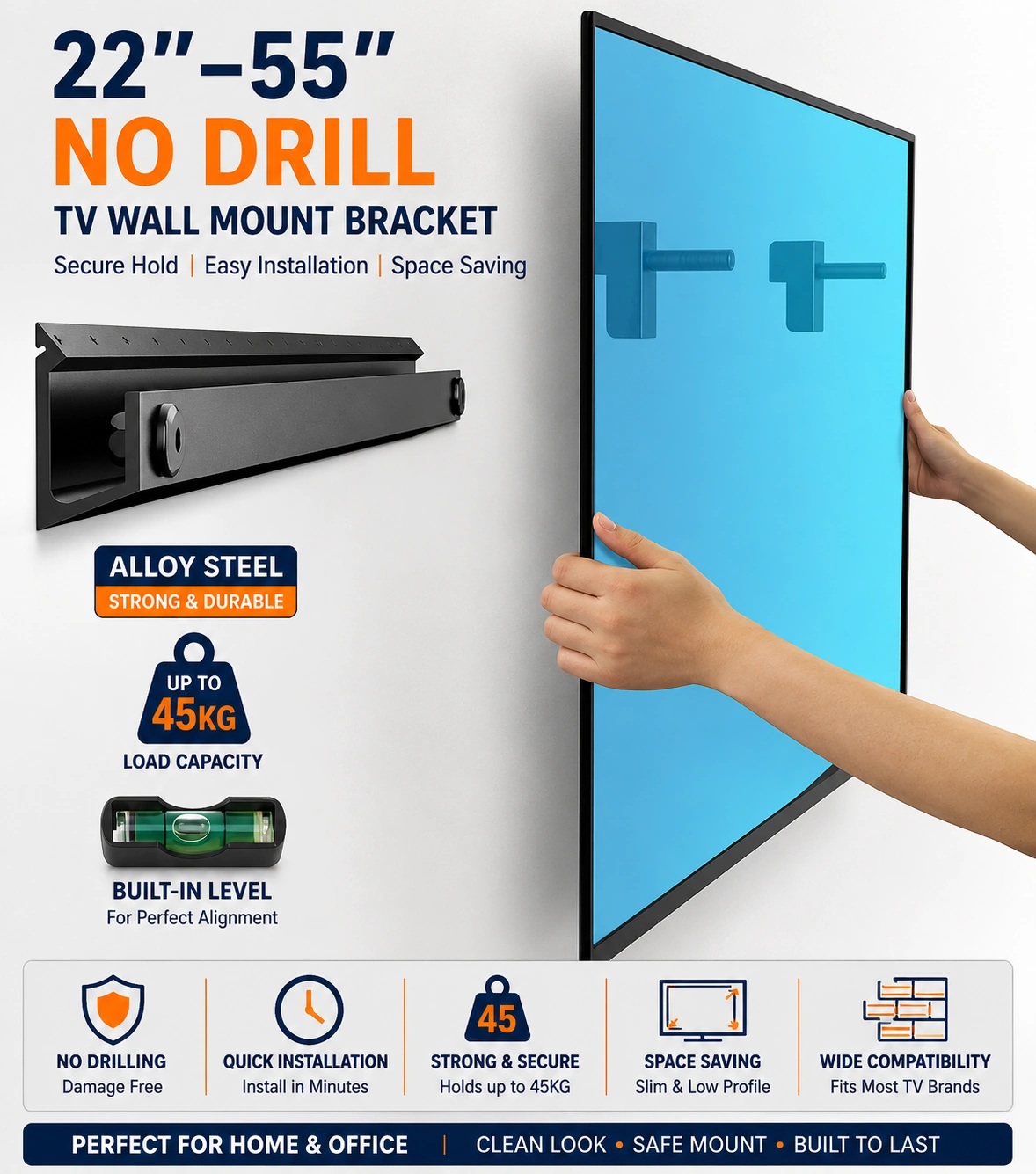
22–55 INCH No Drill TV Wall Mount Bracket, Ultra Slim Universal TV Bracket with +5° Tilt, Supports up to 45kg, TV Bracket Max VESA 400 x 400mm, Easy Install Flat Screen Wall Mount, Black
22–55 Inch No Drill TV Wall Mount Bracket – Ultra Slim Universal TV Mount with +5° Tilt
Create a clean and space-saving television setup with this practical 22–55 inch no drill TV wall mount bracket, designed for compatible flat screen televisions. Featuring an ultra slim profile, +5° tilt adjustment and support for compatible TVs weighing up to 45 kg, the bracket provides a convenient wall mounting solution for bedrooms, living rooms, offices and other suitable indoor spaces.
The universal design supports a maximum VESA mounting pattern of 400 × 400 mm, helping provide compatibility with a wide range of suitable televisions. Its slim construction keeps the TV positioned close to the wall, while the no drill installation format is intended to simplify fitting where compatible wall conditions and supplied installation requirements allow.
22–55 Inch TV Compatibility
The bracket is designed for compatible televisions ranging from approximately 22 to 55 inches. Always confirm the TV's screen size, weight and rear mounting-hole pattern before installation to ensure compatibility.
Supports up to 45 kg
The TV wall mount is specified to support compatible televisions weighing up to 45 kg. Do not exceed the stated load capacity and make sure the wall and installation method are suitable for safely supporting the complete mounted load.
Maximum VESA 400 × 400 mm
The mounting bracket supports a maximum VESA pattern of 400 × 400 mm. Measure the horizontal and vertical spacing between the mounting holes on the back of the television before fitting.
No Drill Installation Design
The bracket is described as a no drill TV wall mount, providing an alternative to conventional drilled installation where the wall type and mounting system are compatible. Always follow the supplied installation instructions and verify that the intended surface is suitable before mounting the television.
Ultra Slim Profile
The ultra slim design helps keep a compatible television positioned close to the wall, creating a neat and streamlined appearance while reducing the space occupied by a conventional floor TV stand.
+5° Tilt Adjustment
The bracket provides a specified +5° tilt function, allowing the television angle to be adjusted slightly according to the viewing position and mounting height.
Universal TV Bracket
The universal mounting format makes the bracket suitable for a range of compatible televisions rather than one specific model. Compatibility depends on the TV's screen size, complete weight and VESA mounting pattern.
Flat Screen Wall Mount
Designed as a practical flat screen wall mount, the bracket provides a simple way to position compatible televisions on the wall while maintaining a clean and organised entertainment area.
Space Saving Design
Wall mounting can help free up suitable furniture and floor space by removing the need for a large television stand. The slim format makes the bracket particularly useful where efficient use of available room space is important.
Living Room TV Mount
Use the bracket to create a clean and practical living room television setup, helping keep the screen close to the wall while reducing clutter around the entertainment area.
Clean Modern Appearance
The combination of an ultra slim profile and black finish creates a discreet appearance that can coordinate naturally with many televisions and modern home or office interiors.
Black Finish
The bracket is supplied in black, helping it blend discreetly behind many compatible televisions while maintaining a neat and professional appearance.
TV Compatibility Check
Before installation, confirm that your television is within the 22–55 inch size range, weighs no more than 45 kg and uses a compatible VESA mounting pattern up to 400 × 400 mm.
Wall Compatibility Check
Because installation suitability depends on the wall construction and mounting method, inspect the intended wall carefully and follow the supplied instructions. Do not mount the television on an unsuitable, weak or damaged surface.
Secure Installation Guidance
Ensure every mounting component is correctly fitted and securely engaged before attaching the television. Check that the TV remains stable after installation and consider professional fitting if the wall structure or mounting suitability is uncertain.
Easy Installation Format
The bracket is designed for easy installation compared with conventional wall mounting systems, but the exact fitting procedure should always follow the supplied product instructions and the requirements of the installation surface.
Practical Slim TV Mounting Solution
Combining 22–55 inch TV compatibility, support up to 45 kg, maximum VESA 400 × 400 mm, +5° tilt adjustment, no drill installation and an ultra slim profile, this universal TV bracket provides a practical space-saving mounting solution for compatible flat screen televisions.
Package Information
Package Weight: 550 grams
Package Dimensions: 65.50 × 5.50 × 3.50 cm
Carton Information
Pieces in Carton: 30
Carton Net Weight: 16.00 kg
Carton Gross Weight: 16.50 kg
Carton Dimensions: 66.00 × 29.50 × 33.00 cm
Why Choose ATEK?
ATEK offers practical home, technology and entertainment accessories designed to support convenient everyday installation and use. With an emphasis on functional design, space-saving construction, useful compatibility and straightforward setup, ATEK provides practical solutions for modern television and home entertainment arrangements.
About this item
- 22-55 Inch TV Compatibility: Designed for compatible televisions from 22 to 55 inches, providing a practical wall mounting solution for small and medium-sized flat-screen TVs in bedrooms, living rooms, offices, kitchens, and entertainment areas.
- No Drill TV Wall Mount: Designed as a no-drill television mounting solution, making it suitable for compatible installations where users prefer to avoid conventional drilled wall mounting.
- Ultra Slim TV Bracket: The slim-profile design helps position a compatible television neatly against the wall, creating a clean, modern, and space-saving appearance in suitable rooms.
- Universal TV Mount Design: Suitable for a broad range of compatible flat-screen televisions within the stated 22-55 inch size, 45kg weight, and VESA 400 x 400mm mounting requirements.
- +5° Tilt Adjustment: Features a +5° tilt function that allows the mounted television angle to be adjusted slightly, helping achieve a more suitable screen position according to mounting height and viewing preference.
- Supports up to 45kg: Designed to support compatible televisions weighing up to 45kg, providing substantial load capacity for many small and medium flat-screen TV models when installed correctly.
- Max VESA 400x400mm: Supports compatible television mounting-hole patterns up to VESA 400 x 400mm, helping accommodate a wide selection of televisions within the stated size and weight requirements.
- Easy Installation Design: Created with straightforward installation in mind, providing a practical option for compatible televisions where a simple and organized wall-mounted setup is preferred.
- Flat Screen Wall Mount: Designed for compatible flat-screen televisions, providing a neat alternative to placing the TV on furniture, cabinets, tables, or freestanding entertainment units.
- Space-Saving TV Solution: Wall mounting helps free valuable furniture and floor space while creating a cleaner entertainment arrangement in bedrooms, living areas, offices, and other suitable locations.
- Practical Viewing Angle: The +5° tilt provides useful screen-angle adjustment without the bulk of a full-motion bracket, making it suitable for locations where only limited positioning flexibility is required.
- Bedroom TV Bracket: A practical choice for compatible bedroom televisions where a slim wall-mounted installation can help save furniture space and keep the screen positioned neatly.
- Living Room TV Mount: Suitable for compatible televisions in living rooms and lounges where users want a clean, compact, and organised wall-mounted entertainment setup.
- Office Display Solution: Suitable for compatible television displays in offices, meeting spaces, reception areas, workplaces, and other professional environments requiring a neat wall installation.
- Versatile Room Placement: Suitable for compatible TVs in bedrooms, living rooms, kitchens, offices, entertainment spaces, and other locations where a slim wall-mounted screen is preferred.
- Reduces Need for TV Furniture: Installing the television on the wall can reduce dependence on large TV cabinets or stands, helping create a more open and organised room arrangement.
- Professional Black Finish: The black finish provides a discreet, modern appearance that coordinates naturally with most televisions, entertainment equipment, and contemporary room interiors.
- Check TV Compatibility: Before installation, confirm that the television measures between 22 and 55 inches, weighs no more than 45kg, and uses a compatible mounting pattern no larger than VESA 400 x 400mm.
- Complete No Drill TV Mount Solution: Combining 22-55 inch TV compatibility , a no-drill mounting design, ultra-slim profile, +5° tilt adjustment, support for televisions up to 45kg, maximum VESA 400 x 400mm, and a professional black finish, this bracket is ideal for bedrooms, living rooms, offices, kitchens, entertainment areas, and space-saving flat-screen TV installations .
For custom volume pricing or bulk orders, request a formal quote.
Currently Out of Stock
Direct purchasing is currently disabled for this item. Request a formal quotation below.
| Seller | eBuyerhub Store |
| How to use | 1. Check TV and Wall Compatibility Before installation, confirm that the television is between 22 and 55 inches, weighs no more than 45kg, and uses a compatible VESA mounting pattern up to 400 x 400mm. Check that the wall surface and the supplied no-drill mounting system are suitable for the intended installation and television weight. 2. Choose the Mounting Position Select a comfortable viewing height and position for the television. Hold the bracket against the intended installation area, use a spirit level to keep it straight, and make sure there is sufficient space around the TV for ventilation, connections, and the +5° tilt adjustment. 3. Install the No-Drill Mounting System Fit the wall bracket using the supplied no-drill mounting components and follow the installation arrangement provided with the bracket. Make sure every fixing point is correctly positioned, fully engaged, and securely tightened before placing any weight on the mount. Do not substitute unsuitable fixings. 4. Attach the Brackets to the TV Select the correct screws and spacers for the television and align the mounting arms with the TV's VESA holes. Tighten each screw evenly without overtightening, cross-threading, or forcing screws that do not correctly match the television's threaded mounting points. 5. Mount and Secure the Television With assistance from another person, carefully lift the television and attach it to the installed wall bracket. Engage all locking or safety mechanisms completely and check that the TV is firmly supported and level before releasing it. 6. Adjust the Viewing Angle Use the +5° tilt function to adjust the television to the preferred viewing angle. Support the TV with both hands while making adjustments and avoid applying sudden force or attempting to move the bracket beyond its intended tilt range. 7. Arrange Cables and Inspect the Mount Route power, HDMI, aerial, and other connected cables neatly so they are not trapped, stretched, or pinched behind the ultra-slim bracket. Regularly inspect the mounting points, VESA screws, locking mechanism, and tilt components for looseness, movement, wear, or visible damage. 8. Maintain and Use Safely Clean the black wall bracket with a soft, dry cloth and avoid applying liquids directly to the mounting mechanism. Never exceed the stated 45kg maximum load or hang additional objects from the bracket. If the wall surface, no-drill fixings, or bracket becomes loose or unstable, remove the load and stop using the mount until the installation has been checked. |