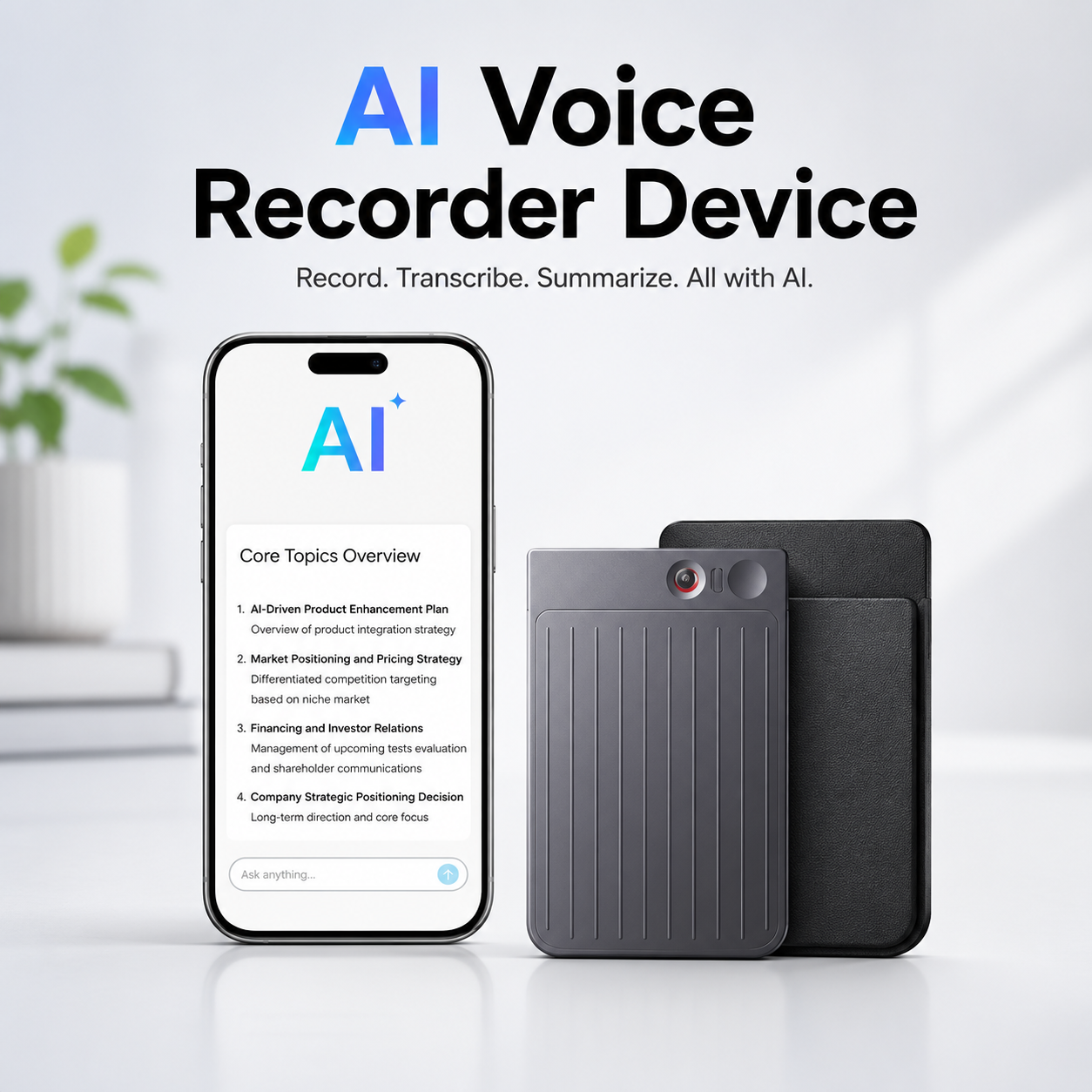
64GB AI Voice Recorder Device, Digital Dictaphone with App Control, AI Transcribe & Summarise in 112 Languages, Audio Recorder with Case for Lectures, Meetings & Call Recording
64GB AI Voice Recorder with App Control, Transcription & Summarisation
Capture lectures, meetings, conversations and other permitted audio with this versatile 64GB AI voice recorder, combining digital recording with app control, AI transcription and AI summarisation in up to 112 languages. Its compact portable format provides a practical recording solution for students, professionals, interviews, meetings, study sessions and everyday note-taking.
The digital dictaphone includes a protective case and is designed to combine audio recording with intelligent organisation features. Supported recordings can be processed through compatible AI functions to create transcripts and summaries, helping users review lengthy lectures, discussions and meetings more efficiently without relying entirely on handwritten notes.
64GB Storage Capacity
The recorder is specified with 64GB of storage, providing substantial space for compatible audio recordings before files need to be transferred, managed or deleted.
AI Voice Recorder
Integrated AI-supported functionality helps transform suitable recorded audio into more useful written information, supporting efficient review of meetings, lectures and spoken notes.
AI Transcription
The recorder supports AI transcription, allowing compatible recorded speech to be converted into written text through the associated service or application.
AI Summarisation
Supported AI summarisation can help condense longer recordings and transcripts into shorter notes, making it easier to review key information from lengthy discussions or study sessions.
Supports up to 112 Languages
The transcription and summarisation functionality is specified to support up to 112 languages, providing versatile use for multilingual recordings where the selected language is supported by the associated AI service.
App Control
Compatible app control provides a convenient way to access supported recorder functions, manage recordings and use available AI transcription or organisation features from a connected device.
Digital Dictaphone Design
The portable digital dictaphone format is designed for convenient spoken-note capture, providing an alternative to relying solely on a smartphone for everyday recording tasks.
Lecture Recording
Students can use the recorder for permitted lectures and educational sessions, helping preserve spoken information for later study, transcription and revision.
Meeting Recording
The device is useful for authorised business meetings, discussions and presentations, allowing spoken content to be reviewed after the event and processed using supported AI features.
Call Recording Capability
The product is specified for suitable call recording. Compatibility can depend on the connected device, operating system, application and recording method, so the relevant setup requirements should be checked before use.
Interview & Research Use
When consent and applicable requirements are satisfied, the recorder can provide a practical way to capture interviews, research conversations and spoken reference material.
Spoken Note Taking
Record ideas, reminders, project notes and other spoken information when writing is inconvenient, then organise or review the captured audio later.
Protective Case Included
A case is included to help keep the recorder organised and provide convenient protection during suitable everyday storage and transport.
Compact Portable Recorder
The compact design makes the device suitable for carrying in a work bag, backpack or other protective storage area for convenient use between meetings, lectures and travel.
Recording Quality Considerations
For clearer recordings, position the device appropriately and minimise unnecessary background noise where possible. Transcription accuracy can vary with speaker clarity, accents, overlapping speech, background noise and recording conditions.
AI Accuracy Guidance
AI-generated transcripts and summaries may contain errors or omit context. Important names, figures, quotations and decisions should always be checked against the original recording before being relied upon.
Recording Consent & Privacy
Only record conversations, calls, meetings or lectures when permitted. Recording and transcription laws and institutional rules can vary, so obtain any required consent and respect privacy before capturing or processing other people's speech.
Protect Sensitive Recordings
Recordings and transcripts may contain personal or confidential information. Store files securely, control access to connected accounts and delete sensitive material when it is no longer required.
Practical AI Recording Solution
Combining 64GB storage, app control, AI transcription, AI summarisation in up to 112 languages and a portable case, this digital voice recorder provides a practical solution for permitted lectures, meetings, spoken notes, interviews and compatible call-recording applications.
Package Information
Package Weight: 120 grams
Package Dimensions: 15.20 × 11.40 × 18.00 cm
Carton Information
Pieces in Carton: 2
Carton Net Weight: 11.00 kg
Carton Gross Weight: 12.00 kg
Carton Dimensions: 47.50 × 32.00 × 24.00 cm
Why Choose SAMTEK?
SAMTEK offers practical technology and productivity accessories designed around convenient recording, portable everyday use and efficient information management. With an emphasis on smart functionality, organised note capture and useful digital tools, SAMTEK provides practical solutions for study, meetings, professional discussions and everyday voice recording.
About this item
- AI Voice Recorder: Smart digital voice recorder combines high-quality audio recording with AI-powered transcription and summarization for improved productivity.
- AI Transcribe & Summarise: Automatically converts recorded speech into text and generates concise summaries, helping save time when reviewing recordings.
- Supports 112 Languages: Advanced AI transcription supports up to 112 languages , making it suitable for multilingual meetings, lectures, interviews, and conversations.
- 64GB Storage Capacity: Built-in 64GB memory provides ample space for storing hours of recordings, notes, lectures, and voice memos.
- App Control Functionality: Easily manage recordings, playback, settings, and AI features through the companion mobile app for greater convenience.
- High-Quality Digital Recording: Captures clear audio for meetings, interviews, lectures, presentations, phone calls, and personal voice notes.
- Ideal for Meetings: Perfect for recording business meetings, conferences, team discussions, and client conversations for future reference.
- Excellent for Students: Ideal for lectures, seminars, classroom learning, revision, and study notes with AI transcription support.
- Suitable for Interviews: Helps journalists, researchers, recruiters, and professionals accurately capture important conversations.
- Call Recording Support: Suitable for compatible call recording applications, making it useful for documenting important discussions where permitted.
- Compact & Portable Design: Lightweight recorder fits easily into pockets, handbags, backpacks, and briefcases for recording on the go.
- Protective Carry Case Included: Supplied with a durable storage case to help protect the recorder during transport and everyday use.
- Simple One-Touch Recording: Easy-to-use controls allow you to start recording quickly whenever inspiration or important conversations arise.
- Reliable Audio Playback: Convenient playback function makes it easy to review recordings directly from the device or connected app.
- Ideal for Professionals: Perfect for business executives, lawyers, consultants, journalists, teachers, students, and content creators.
- Long-Lasting Performance: Designed for dependable daily recording, note-taking, and voice documentation.
- Versatile Recording Applications: Suitable for lectures, meetings, interviews, conferences, presentations, training sessions, and personal reminders.
- Easy File Management: Organise, access, and manage recordings efficiently using the built-in storage and companion app.
- Productivity Enhancement Tool: AI-powered transcription and summarisation help reduce manual note-taking while improving workflow efficiency.
- Complete AI Recording Solution: Combining AI transcription and summarization , support for 112 languages , 64GB storage , app control, high-quality digital audio recording, compact portable design, protective carry case, and versatile use for lectures, meetings, interviews, calls, conferences, and voice notes , this AI voice recorder provides a smart and efficient solution for capturing and organizing important information.
For custom volume pricing or bulk orders, request a formal quote.
Currently Out of Stock
Direct purchasing is currently disabled for this item. Request a formal quotation below.
| Seller | eBuyerhub Store |
| How to use | 1. Charge and Set Up the Voice Recorder Fully charge the AI voice recorder using the supplied charging cable before first use. Power on the device and follow the user manual to complete the initial setup. If app control is supported, download the compatible mobile application, pair the recorder with your smartphone, and configure the required settings for recording, transcription, and file management. 2. Configure Recording and AI Features Select your preferred recording quality, language, and AI functions within the device or companion app. If available, choose transcription, summarisation, or translation options before starting your recording. Ensure sufficient storage space is available on the 64GB memory for long recording sessions. 3. Position the Recorder Correctly Place the recorder close to the speaker or meeting participants while keeping it on a stable surface or inside a suitable pocket. Position the built-in microphone so voices can be captured clearly. For lectures, interviews, meetings, or voice notes, minimise background noise whenever possible to improve recording and transcription accuracy. 4. Start Recording and Use AI Transcription Press the record button to begin capturing audio. During or after the recording, use the companion app or supported AI features to transcribe, summarise, and organise your recordings in one of the supported languages where available. Save or export your files as needed for study, work, or personal reference. 5. Review and Manage Your Recordings Play back recordings directly on the device or through the companion app to review important conversations, lectures, interviews, or meeting notes. Rename, organise, and back up files regularly to make future searches easier and prevent accidental loss of important recordings. 6. Clean and Recharge the Device After use, wipe the recorder with a soft, dry cloth to remove fingerprints and dust. Keep the microphone openings free from dirt and debris for optimal audio quality. Recharge the battery when necessary to ensure the recorder is ready for your next recording session. 7. Inspect the Recorder Regularly Periodically check the microphone, buttons, charging port, storage capacity, and protective case for signs of wear or damage. Install firmware or app updates when available to maintain recording performance, AI functionality, and compatibility with supported devices. 8. Store the Recorder Safely When not in use, switch off the recorder and place it inside the supplied protective case. Store it in a cool, dry place away from excessive heat, moisture, dust, and direct sunlight. Proper storage and routine maintenance will help preserve battery life, recording quality, and reliable performance for lectures, meetings, interviews, and everyday voice recording. |