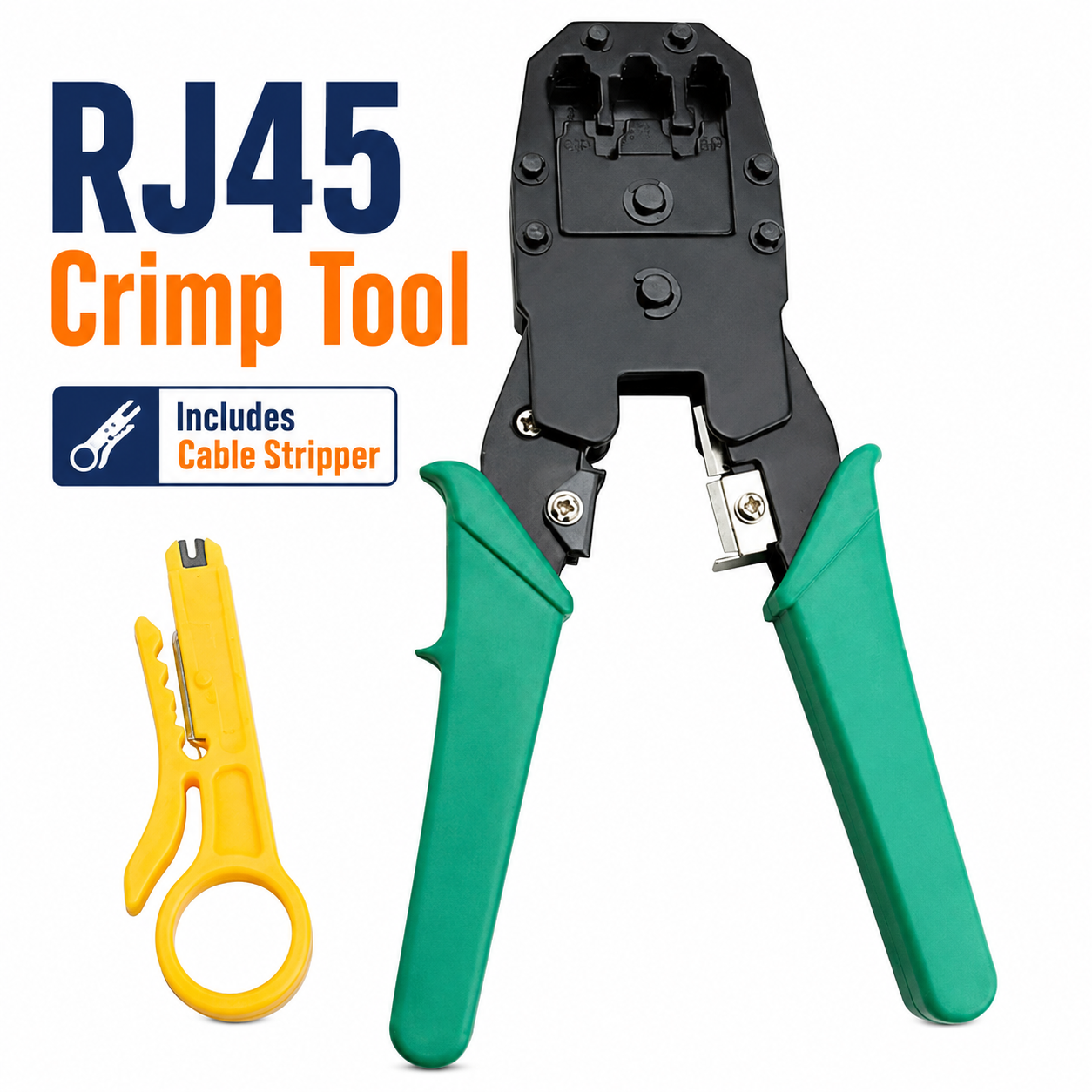
RJ45 Crimp Tool Kit – Ethernet Cable Crimping Tool for 8P8C RJ45 CAT5, CAT5e, CAT6, CAT6A & CAT7 Connectors with Wire Stripper, Cutter and Replaceable Blade
RJ45 Ethernet Cable Crimp Tool Kit
Prepare, cut, strip and crimp network cables with this practical RJ45 crimp tool kit. Designed for compatible 8P8C RJ45 connectors, the tool supports common Ethernet cable types including CAT5, CAT5e, CAT6, CAT6A and CAT7, making it useful for home networking, office installations, IT maintenance and general cable-repair work.
The multifunction design combines an RJ45 crimping mechanism, wire stripper and cable cutter in one convenient hand tool. A replaceable blade provides added practicality for ongoing cable-preparation tasks, helping users maintain the cutting function when the fitted blade eventually becomes worn.
Suitable for technicians, installers, network enthusiasts and DIY users, the compact crimping tool can be used for creating or repairing compatible Ethernet patch cables and structured network connections. Always confirm that the selected connector and cable construction are compatible before crimping.
8P8C RJ45 Crimping
The tool is designed for 8P8C RJ45 modular connectors, allowing compatible plugs to be crimped onto correctly prepared Ethernet cable.
CAT5 Cable Compatibility
Suitable for compatible CAT5 Ethernet cable and RJ45 connector combinations, making the tool useful for maintaining older or existing network installations.
CAT5e Network Cable Support
Use the crimping tool with suitable CAT5e cable and compatible 8P8C connectors for everyday home, office and networking applications.
CAT6 Crimping Applications
The tool supports suitable CAT6 Ethernet cable installations when used with connectors designed for the specific cable diameter and conductor arrangement.
CAT6A Compatibility
The crimper can also be used with compatible CAT6A connectors and cable, subject to the dimensions and construction of the individual plug and cable being terminated.
CAT7 Connector Applications
Suitable for compatible CAT7 cable termination where an appropriate RJ45-style 8P8C connector is used. Always check connector specifications before crimping because CAT7 cable constructions can vary.
Integrated Wire Stripper
The built-in wire stripping function helps remove the outer cable jacket during preparation, reducing the need to carry a separate stripping tool for compatible cables.
Built-In Cable Cutter
An integrated cable cutter allows compatible network cable to be trimmed to the required length before stripping and connector installation.
Replaceable Blade
The tool features a replaceable blade, providing a practical maintenance option when the cutting edge becomes worn through regular use.
Multifunction Network Tool
Combining cutting, stripping and crimping functions in one hand tool helps simplify Ethernet cable preparation and reduces the number of separate tools required for routine installations.
Home Networking Use
The crimp tool is useful for making or repairing compatible network cables for routers, switches, computers, wall ports and other suitable home-networking equipment.
Office & IT Installations
Suitable for office networking, maintenance and IT support work where Ethernet cables need to be cut to length and terminated with compatible RJ45 connectors.
Useful for Cable Repairs
The tool can assist with replacing damaged compatible RJ45 plugs, provided the underlying Ethernet cable remains in suitable condition for retermination.
Custom Ethernet Cable Lengths
Create compatible Ethernet leads to the required length by cutting the cable, preparing the conductors and fitting suitable RJ45 connectors according to the correct wiring standard.
Compact Hand Tool Design
The compact format makes the crimping tool convenient to store in a toolbox, technician's bag, network installation kit or workshop drawer.
Straightforward Cable Preparation
Cut the cable cleanly, strip only the required amount of outer jacket, arrange the conductors in the chosen wiring sequence and insert them fully into a compatible connector before crimping.
Connector Compatibility Check
Before use, confirm that the connector type, cable category, conductor type and cable diameter are compatible. Not every RJ45-style plug is suitable for every Ethernet cable construction.
Blade Safety
Keep fingers clear of the cutting and stripping blades during use. Close or store the tool safely after use and keep replacement blades away from children.
Complete Ethernet Crimping Solution
Combining 8P8C RJ45 crimping, CAT5/CAT5e/CAT6/CAT6A/CAT7 compatibility, integrated wire stripping, cable cutting and a replaceable blade, this multifunction tool provides a practical solution for Ethernet cable installation, maintenance and repair.
Package Information For RFQ 7405
Package Weight: 330 grams
Package Dimensions: 25.6 × 12.5 × 2 cm
Carton Information For RFQ 7405
Pieces in Carton: 50
Carton Net Weight: 17.00 kg
Carton Gross Weight: 18.00 kg
Carton Dimensions: 67.50 × 27.50 × 21.50 cm
Why Choose SAMTEK?
SAMTEK offers practical networking, electrical and hand-tool accessories designed to support everyday installation and maintenance work. With an emphasis on multifunctional design, convenient cable preparation and straightforward operation, SAMTEK provides useful solutions for technicians, installers, DIY users and network maintenance tasks.
About this item
- RJ45 Crimp Tool Kit: A practical networking tool kit designed for preparing and terminating compatible Ethernet cables, making it suitable for home networking, office installations, maintenance, repairs, and general cable-making tasks.
- 8P8C RJ45 Compatibility: Designed for compatible 8P8C RJ45 connectors, providing a useful solution for assembling or repairing Ethernet patch leads and network cables.
- CAT5 Cable Support: Suitable for compatible CAT5 Ethernet cable connectors, helping users prepare custom network cables for suitable routers, switches, patch panels, and other networking equipment.
- CAT5e Compatibility: Supports compatible CAT5e RJ45 connectors, making the crimping tool useful for common home, office, CCTV, and structured network cabling applications.
- CAT6 Connector Support: Designed for compatible CAT6 RJ45 connectors, allowing users to create or maintain network cables for suitable modern Ethernet installations.
- CAT6A Compatibility: Suitable for compatible CAT6A connectors, extending the tool's usefulness across a wider range of structured networking and professional cabling tasks.
- CAT7 Connector Compatibility: Can be used with compatible CAT7 RJ45-style connectors where suitable, providing additional versatility for users working with different Ethernet cable categories.
- Integrated Wire Stripper: Includes a built-in wire stripping function to help remove outer cable insulation before arranging conductors and preparing the cable for connector installation.
- Built-In Cable Cutter: The integrated cutter provides a convenient way to trim Ethernet cable to the required length before stripping, arranging, and crimping the connector.
- Replaceable Blade Design: Features a replaceable blade, allowing the cutting component to be changed when required and helping maintain the tool's practicality for repeated cable-preparation work.
- Crimping & Cable Preparation: Combines crimping, stripping, and cutting functions in one tool, reducing the need to switch between multiple separate hand tools during Ethernet cable assembly.
- Custom Ethernet Cables: Ideal for preparing network cables to specific lengths, helping users create suitable patch leads and installation cables for organised networking setups.
- Home Network Installation: Useful for household networking projects involving compatible routers, switches, wall outlets, patch leads, and Ethernet-connected devices.
- Office Networking Tool: A practical choice for office cabling, workstation connections, equipment rooms, network maintenance, and other environments requiring regular RJ45 cable preparation.
- CCTV Cabling Applications: Suitable for preparing compatible Ethernet cables used in network-based CCTV and IP camera installations where RJ45 connections are required.
- Repair Existing Network Leads: Useful for replacing damaged compatible RJ45 connectors and restoring suitable Ethernet cables without necessarily replacing the entire cable run.
- DIY & Professional Use: Suitable for DIY users, installers, technicians, IT staff, and networking enthusiasts who need a convenient tool for compatible Ethernet cable termination and maintenance.
- Versatile Networking Applications: Useful for patch cable assembly, router connections, switch installations, CCTV systems, office networks, home networks, and other compatible RJ45 Ethernet cabling tasks.
- All-in-One Hand Tool: The combination of crimper, stripper, cutter, and replaceable blade functionality provides a compact and convenient solution for everyday network cable preparation.
- Complete RJ45 Crimping Solution: Combining 8P8C RJ45 compatibility, CAT5, CAT5e, CAT6, CAT6A and CAT7 connector support, integrated wire stripping, cable cutting, and a replaceable blade , this crimp tool kit is ideal for Ethernet cable assembly, network installation, CCTV cabling, patch lead creation, repairs, home networking, office setups, and general RJ45 maintenance .
For custom volume pricing or bulk orders, request a formal quote.
Currently Out of Stock
Direct purchasing is currently disabled for this item. Request a formal quotation below.
| Seller | eBuyerhub Store |
| How to use | 1. Inspect and Prepare the Crimp Tool Before use, inspect the RJ45 crimping tool, wire stripper, cutter, handles, crimping jaws, and replaceable blade for visible damage, looseness, or excessive wear. Make sure the tool opens and closes smoothly and keep fingers away from the cutting and crimping areas. 2. Measure and Cut the Ethernet Cable Measure the required cable length and use the built-in cutter to make a clean, straight cut. Position the cable correctly in the cutting section, squeeze the handles firmly, and avoid placing fingers near the blade while cutting CAT5, CAT5e, CAT6, CAT6A, or CAT7 cable. 3. Strip the Outer Cable Jacket Place the cable into the stripping section and carefully remove only enough outer jacket for connector preparation. Rotate or operate the stripper gently according to the tool design, taking care not to cut or damage the internal twisted conductors. 4. Arrange the Conductors Untwist and straighten the individual conductors only as much as necessary, then arrange them according to the required T568A or T568B wiring standard. Trim the conductor ends evenly so they can slide fully into the compatible 8P8C RJ45 connector. 5. Insert the RJ45 Connector Push the prepared conductors fully into the RJ45 plug, making sure each wire remains in the correct order and reaches the front of the connector. Check that the cable jacket sits far enough inside the plug to be secured by the strain-relief area during crimping. 6. Crimp the Connector Securely Place the loaded RJ45 connector into the correct 8P8C crimping slot and squeeze the handles firmly until the crimping cycle is complete. Remove the connector and inspect the contacts and cable grip to make sure they have been pressed evenly and securely. 7. Test and Maintain the Tool Test the completed Ethernet cable with a suitable network cable tester before installation or regular use. After crimping, remove wire fragments and jacket debris from the tool, inspect the jaws and blade, and replace the blade when it becomes worn or no longer produces clean cuts. 8. Store the Kit Safely Close or lock the crimp tool where the design allows and store it in a clean, dry place away from moisture, children, and loose objects that could contact the cutting blade. Keep replacement blades and accessories organized so they remain protected and ready for future network installation work. |