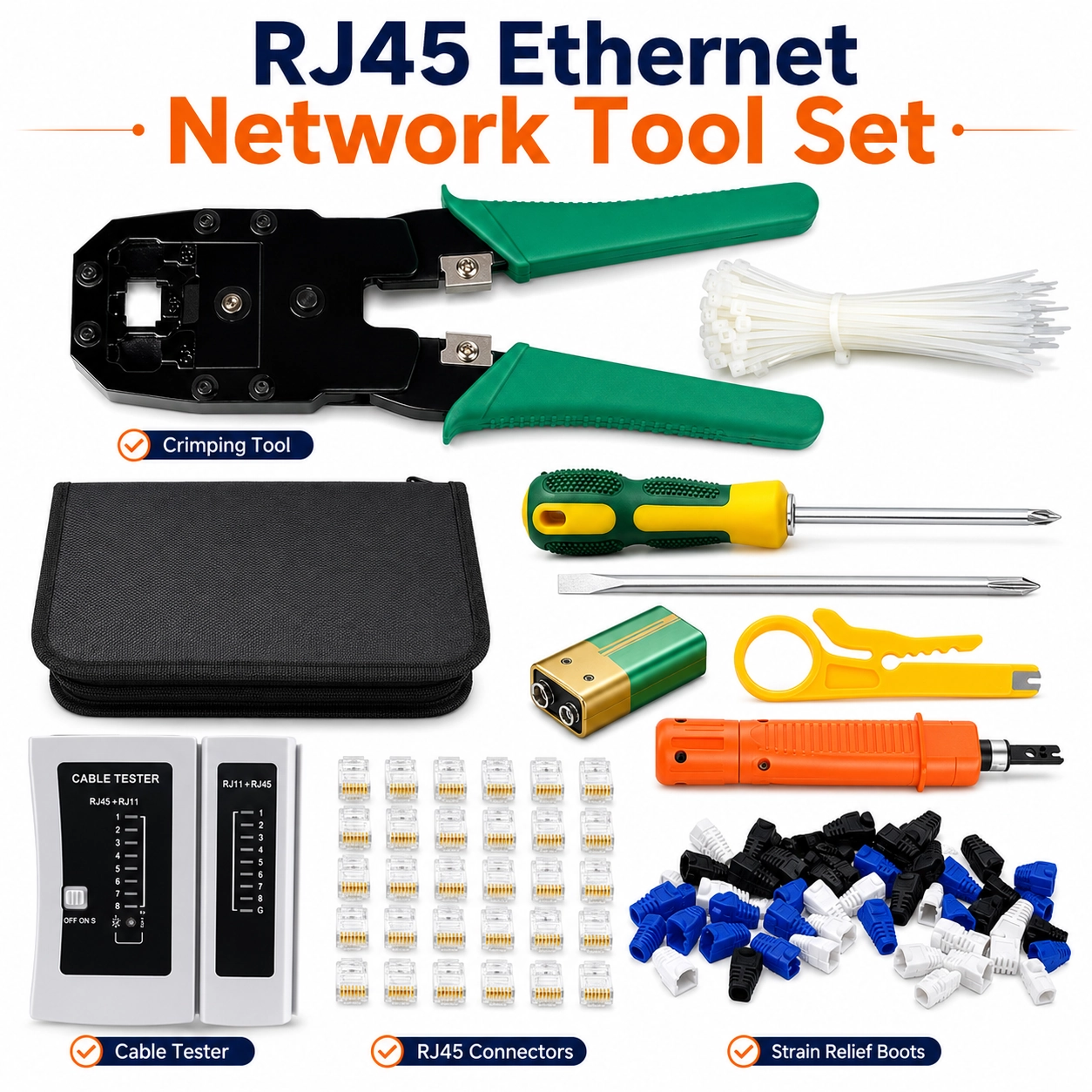
RJ45 Ethernet Network Tool Set, 9-in-1 Networking Cable Tester Tracer for RJ45 Ethernet LAN Cable For CCTV Cat5e Cat6, Cat7 cat8 Wire Crimper Cutter Punch Crimping Repair Tool
RJ45 Ethernet Network Tool Set – 9-in-1 Cable Tester, Tracer & Crimping Kit
Handle a wide range of networking installation, testing and repair tasks with this practical RJ45 Ethernet Network Tool Set. Designed as a versatile 9-in-1 networking kit, it combines cable testing, tracing, crimping, cutting and punch-down functions for use with compatible RJ45 Ethernet LAN cables, CCTV installations and Cat5e, Cat6, Cat7 and Cat8 wiring.
The set is suitable for technicians, installers, maintenance teams and DIY users working with wired network connections. Its combination of dedicated hand tools and cable diagnostic functions helps support installation, fault checking, connector preparation and general Ethernet cable maintenance in homes, offices, workshops and CCTV environments.
9-in-1 Networking Tool Set
The kit is supplied as a 9-in-1 networking tool set, bringing together multiple commonly used tools for Ethernet cable preparation, installation, testing and repair in one practical package.
RJ45 Ethernet Cable Testing
The included network testing function is designed for checking compatible RJ45 Ethernet LAN cable connections, helping users identify wiring issues during installation or troubleshooting.
Cable Tracing Function
The set includes a cable tracing function for locating or following compatible network cable runs, making it useful when working with multiple cables in cabinets, offices, CCTV installations or structured wiring areas.
RJ45 Crimping Tool
The included wire crimper is designed for preparing compatible RJ45 network connectors, helping users create or repair Ethernet cable terminations as part of installation and maintenance work.
Integrated Cable Cutting
A cutting function supports neat cable preparation before stripping, arranging and terminating compatible network wires.
Punch Down Tool
The included punch-down tool is useful for seating compatible network conductors into suitable terminals, keystone modules, patch panels or similar structured-cabling components.
Cat5e Cable Compatibility
The tool set is designed for use with compatible Cat5e Ethernet cable, making it useful for common home, office and networking installations.
Cat6 Cable Compatibility
Suitable compatible Cat6 networking cable can also be prepared, tested and serviced using the appropriate tools included in the kit.
Cat7 & Cat8 Cable Use
The set is described for compatible Cat7 and Cat8 wiring as well. Always confirm that the exact connector type, cable construction and tool dimensions are suitable for the particular cable being terminated.
CCTV Network Installation
The kit is suitable for compatible CCTV networking installations where RJ45 Ethernet cabling is used to connect cameras, recorders, switches or other compatible network equipment.
LAN Cable Repair
Use the tools for general LAN cable repair and maintenance, including replacing compatible connectors, preparing damaged cable ends and checking completed cable runs.
Connector Preparation
The crimping, cutting and punch-down functions support the main stages of compatible connector preparation, helping make network installation work more organised and efficient.
Network Fault Checking
The tester and tracing functions can assist with identifying common network cabling problems before equipment is returned to service, reducing unnecessary trial-and-error during troubleshooting.
Portable Networking Kit
Combining several essential networking tools into one set helps reduce the need to carry multiple separate tools during installation, repair or site maintenance work.
Correct Cable Sequence
When terminating RJ45 connectors, arrange conductors according to the required wiring standard and verify the completed connection with the appropriate testing function before placing the cable into service.
Safe Tool Handling
Use care around cutting blades, crimping mechanisms and punch-down components. Keep fingers clear of moving and sharp parts and store tools safely when not in use.
Disconnect Before Cable Work
Where appropriate, disconnect compatible network equipment and ensure cables are safe to work on before cutting, stripping, punching down or replacing connectors.
Cable Compatibility Check
Before crimping or punching down, confirm that the connector, cable category, conductor construction and intended termination method are compatible with the selected tool.
Practical Network Installation & Repair Solution
Combining RJ45 cable testing, cable tracing, crimping, cutting and punch-down functions, this 9-in-1 Ethernet network tool set provides a practical solution for compatible Cat5e, Cat6, Cat7, Cat8, LAN and CCTV cabling installation, testing and maintenance.
Package Information
Package Weight: 1.17 kg
Package Dimensions: 27.00 × 16.00 × 6.50 cm
Carton Information
Pieces in Carton: 10
Carton Net Weight: 12.50 kg
Carton Gross Weight: 13.00 kg
Carton Dimensions: 33.50 × 28.00 × 34.50 cm
Why Choose ATEK?
ATEK offers practical networking, installation and maintenance accessories designed for convenient everyday technical work. With an emphasis on versatile functionality, organised tool solutions and practical cable maintenance, ATEK provides useful products for networking, CCTV, home, office and workshop applications.
About this item
- 9-in-1 Network Tool Set: Complete RJ45 Ethernet networking kit designed for cable testing, tracing, crimping, cutting, punching and general LAN cable repair tasks.
- RJ45 Cable Tester: Includes network cable testing functionality for checking compatible RJ45 Ethernet connections during installation, maintenance and troubleshooting.
- Cable Tracing Function: Tracing capability helps identify compatible network cables within wiring setups, making it useful for organised maintenance and fault-finding work.
- Suitable for Cat5e: Compatible with Cat5e Ethernet cabling for common home, office, CCTV and structured network installation tasks.
- Cat6 Cable Compatible: Suitable for compatible Cat6 network cables, making the set useful for modern LAN installations and maintenance work.
- Supports Cat7 & Cat8: Designed for compatible Cat7 and Cat8 cabling applications where the included tools and connector requirements are suitable.
- RJ45 Crimping Tool: Crimper function is intended for fitting compatible RJ45 connectors onto Ethernet cable during cable making and repair jobs.
- Built-In Cable Cutter: Cutting functionality helps trim compatible networking cable cleanly during preparation and installation work.
- Punch Tool Included: Punching function supports compatible network termination tasks, making the kit useful for structured cabling and maintenance applications.
- CCTV Networking Use: Practical for compatible CCTV Ethernet cabling installations where RJ45 network cables are used for data connections.
- LAN Cable Installation: Suitable for creating, checking and maintaining compatible Ethernet LAN cables in homes, offices, workshops and network installations.
- Cable Repair Tool Kit: Useful for repairing or replacing compatible RJ45 cable ends and carrying out basic network cable maintenance.
- Troubleshooting Support: Tester and tracer functions help technicians identify cable routes and investigate connection problems within compatible networking systems.
- For Home Networking: Suitable for DIY users setting up or maintaining compatible routers, switches, network sockets and Ethernet-connected equipment.
- Professional Maintenance Use: Practical for network installers, CCTV technicians, IT maintenance staff and other users working with compatible Ethernet cabling.
- Multi-Function Cable Preparation: Combines several common cable preparation functions in one set, helping reduce the need to purchase separate networking tools.
- Useful for Cable Identification: Tracing functionality can assist when multiple compatible Ethernet cables are installed together and individual cable routes need to be identified.
- Versatile Networking Kit: Suitable for network installation, cable making, CCTV setup, Ethernet maintenance, connector crimping, wire cutting and compatible repair work.
- Check Cable & Connector Compatibility: Before use, confirm the cable category, RJ45 connector type and intended termination method are compatible with the relevant tools in the kit.
- Complete RJ45 Networking Solution: Combining a 9-in-1 tool set, RJ45 cable tester, cable tracer, crimper, cutter, punch functionality and support for compatible Cat5e, Cat6, Cat7 and Cat8 cabling , this kit is ideal for LAN installation, CCTV networking, Ethernet cable making, testing, tracing, maintenance and repair .
For custom volume pricing or bulk orders, request a formal quote.
Currently Out of Stock
Direct purchasing is currently disabled for this item. Request a formal quotation below.
| Seller | eBuyerhub Store |
| How to use | 1. Unpack and Inspect the Networking Tool Set Carefully unpack the 9-in-1 RJ45 Ethernet network tool set and inspect the cable tester, tracer, crimping tool, cutter, punch tool and other supplied accessories for visible damage or missing components before use. 2. Prepare the Network Cable Measure the required length of Cat5e, Cat6, Cat7 or Cat8 network cable and cut it cleanly using the appropriate cutting tool. Ensure the cable is disconnected from powered equipment before cutting, stripping or terminating it. 3. Strip the Cable Carefully Use the suitable stripping section of the tool to remove the required amount of outer cable jacket without damaging the internal conductors. Arrange the exposed wire pairs carefully in preparation for termination. 4. Arrange and Insert the Wires Arrange the individual conductors according to the required wiring standard for your network installation. Straighten and trim the conductors evenly, then insert them fully into a compatible RJ45 connector while checking that the wire order remains correct. 5. Crimp the RJ45 Connector Place the prepared RJ45 connector into the correct crimping position and squeeze the handles firmly and evenly to complete the termination. Remove the connector and visually check that the contacts and cable-retention section have been properly secured. 6. Use the Punch Tool Where Required For compatible network sockets, patch panels or terminals, position each conductor in its designated slot and use the punch tool to seat it correctly. Follow the wiring markings on the specific network component and keep fingers clear of cutting edges. 7. Test and Trace the Cable Connect the completed cable to the appropriate ports of the supplied tester to check the conductor sequence and identify common wiring problems. Use the tracing function according to the tester instructions when locating or identifying suitable network cables, including Ethernet LAN and compatible CCTV installations. 8. Clean and Store the Tool Set After use, disconnect the tester, remove cable scraps and wipe the tools with a clean, dry cloth. Inspect cutting and crimping areas periodically for wear and store the complete networking tool set in a clean, dry location away from moisture and unauthorised use. |