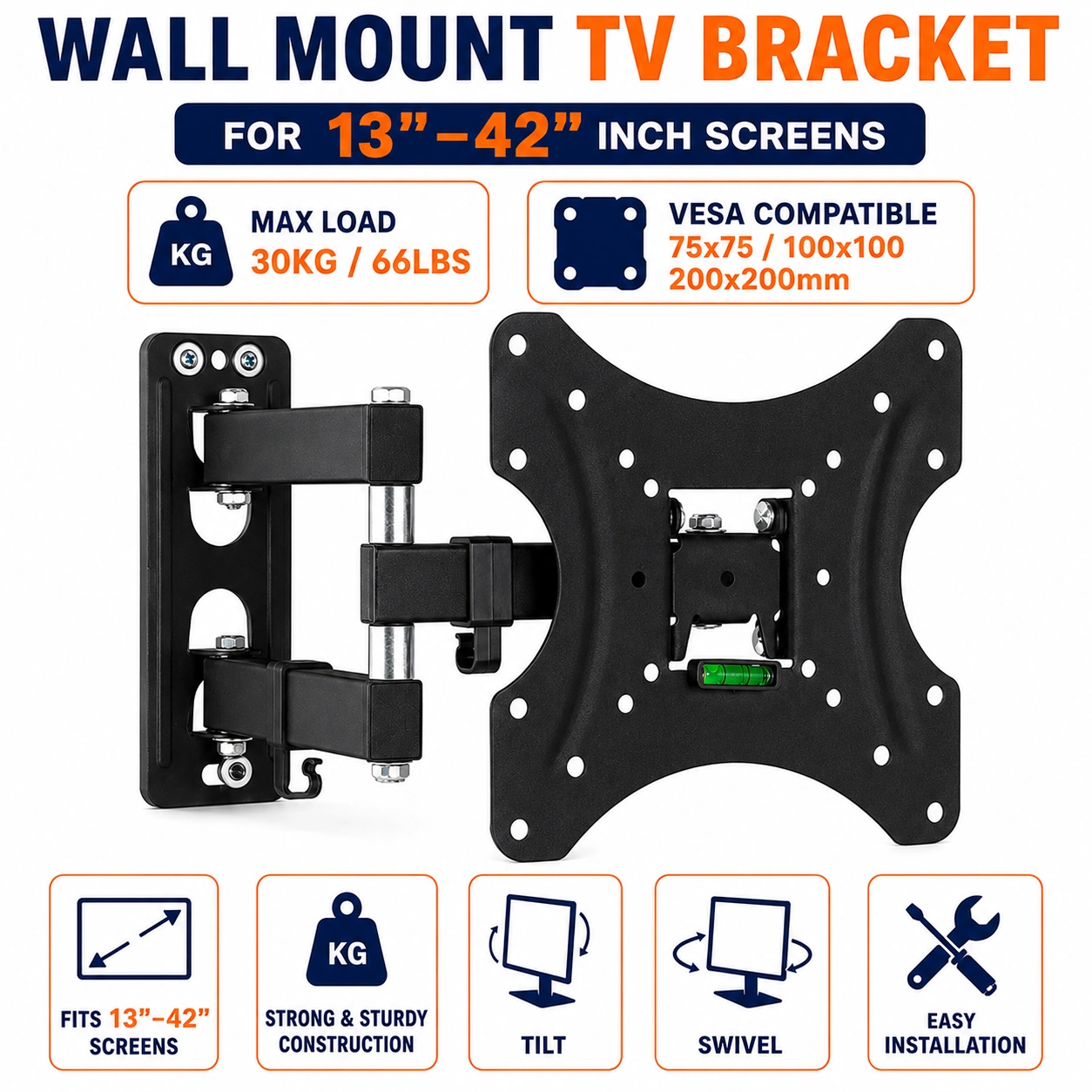
Wall Mount Tilt Swivel Extend Diagonal Screen Size Greater than 50", 20" - 27", 28" - 32", 41" - 46", 33" - 40", 47" - 50" TV Bracket VESA 200x200, 200x100, 100x100 & 75x7 for 13-42 Inch Smart, LED, P
Wall Mount TV Bracket – Tilt, Swivel & Extend Adjustable TV Wall Mount
Create a practical and space-saving TV setup with this versatile wall mount TV bracket, designed for compatible 13–42 inch Smart, LED, Plasma and LCD televisions. Featuring tilt, swivel and extend adjustment, the bracket provides flexibility when positioning a compatible screen on the wall while helping create a cleaner and more organised viewing area.
The bracket supports a range of VESA mounting patterns including 200 × 200, 200 × 100, 100 × 100 and 75 × 75 mm, helping provide compatibility with a variety of suitable television mounting configurations. With a stated maximum supported load of 30 kg, always check the TV's weight, VESA pattern and mounting requirements before installation.
Compatible 13–42 Inch TVs
Designed for compatible screens from approximately 13 to 42 inches, the bracket can be used with suitable Smart TVs, LED TVs, Plasma TVs and LCD TVs. Always confirm the screen size, weight and mounting pattern before fitting the bracket.
Tilt Adjustment
The tilt function allows a compatible screen to be adjusted to a suitable viewing angle after installation. This provides flexibility when positioning the television according to the room layout, seating position and desired viewing direction.
Swivel Function
The swivel adjustment provides additional flexibility for changing the screen's viewing direction where the installation configuration allows. Adjust the television carefully and avoid applying excessive force to the mounted screen.
Extendable Design
The extendable wall mount design provides flexibility when positioning the television away from or closer to the wall according to the available mounting configuration. This can help accommodate different viewing arrangements while maintaining a wall-mounted setup.
Multiple VESA Patterns
The bracket supports several common VESA mounting patterns: 200 × 200, 200 × 100, 100 × 100 and 75 × 75 mm. Check the mounting holes on the back of the television and confirm that they match the bracket before installation.
30 kg Maximum Support
The bracket has a stated maximum load capacity of 30 kg. The television's actual weight must be within the supported limit, and the wall, fixings and installation method must also be suitable for the combined load.
Space Saving Wall Mount
Mounting the television securely to a suitable wall can help reduce the need for a large TV stand or cabinet. The wall-mounted arrangement can provide a cleaner and more organised entertainment area while making efficient use of available room space.
Suitable for Smart TVs
The bracket is suitable for compatible Smart TVs within the supported screen size, weight and VESA specifications. Confirm all television measurements before beginning installation.
LED & LCD TV Support
Compatible LED and LCD televisions can be mounted when their dimensions, weight and VESA mounting holes meet the bracket requirements. Always verify compatibility with the television manufacturer's specifications.
Plasma TV Compatibility
The bracket is also specified for compatible Plasma televisions within the supported size and weight range. Due to differences between television models, confirm the VESA pattern and total weight before mounting.
Flexible Viewing Position
The combination of tilt, swivel and extend adjustment provides greater flexibility when positioning a compatible screen. This makes the bracket useful for rooms where the ideal viewing position may change depending on seating or furniture arrangement.
Suitable for Different Room Setups
The adjustable wall mount can be used in suitable living rooms, bedrooms, offices, entertainment areas and other indoor spaces where a compatible television needs to be wall mounted.
Practical Mounting Accessory
This TV bracket provides a practical mounting solution for compatible screens requiring adjustable positioning. Use the supplied mounting accessories and installation instructions where applicable, and ensure all fittings are securely tightened before placing the television on the bracket.
Installation Compatibility
Before installation, check the wall construction, television weight, VESA pattern, screen size and fixing requirements. Suitable wall fixings must be selected for the specific wall type, and professional installation may be appropriate where required.
Safe Screen Positioning
After mounting, adjust the screen carefully using the bracket's available movement. Do not exceed the supported load or force the swivel, tilt or extension mechanism beyond its intended range.
Practical Adjustable TV Wall Mount Solution
Combining tilt, swivel and extend adjustment, multiple VESA compatibility, 13–42 inch screen support and a stated 30 kg maximum load capacity, this TV wall bracket provides a versatile mounting solution for compatible Smart, LED, Plasma and LCD televisions while helping save space and create a more organized viewing area.
Package Information
Package Dimensions: 31.00 × 23.00 × 4.50 cm
Individual Weight: 1.20 kg
Carton Information
Pieces in Carton: 10
Carton Net Weight: 12.00 kg
Carton Gross Weight: 12.50 kg
Carton Dimensions: 41.50 × 32.00 × 24.00 cm
Why Choose ATEK?
ATEK offers practical home, electronics and household accessories designed to support convenient everyday use and organisation. With an emphasis on functional design, practical installation solutions, space-saving products and everyday convenience, ATEK provides useful accessories for modern homes and living spaces.
About this item
- Universal TV Wall Mount: Wall mounting bracket designed for compatible 13-42 inch Smart, LED, Plasma, and LCD televisions, providing a practical space-saving mounting solution.
- Tilt & Swivel Adjustment: Adjustable tilt and swivel functionality allows the mounted screen to be positioned for a more suitable viewing angle according to room layout and seating position.
- Extendable Design: Extendable arm construction provides flexible screen positioning, allowing the television to be moved away from or closer to the wall when required.
- Supports Up to 30kg: Designed to support compatible television screens with a maximum stated load capacity of up to 30kg when correctly installed on a suitable wall surface.
- VESA Compatibility: Supports VESA mounting patterns including 200x200, 200x100, 100x100, and 75x75, subject to compatibility with the television's mounting points.
- 13-42 Inch TV Support: Suitable for compatible televisions ranging from 13 to 42 inches, providing a versatile mounting option for many compact and medium-sized screens.
- Smart TV Compatible: Suitable for compatible Smart TVs within the supported screen size, VESA pattern, and weight specifications.
- LED & LCD TV Bracket: Designed for compatible LED and LCD televisions, offering a practical wall-mounted alternative to conventional TV stands.
- Plasma TV Support: Can be used with compatible Plasma televisions that meet the specified screen size, VESA mounting pattern, weight, and installation requirements.
- Space-Saving Wall Mount: Mounting the television on the wall helps free up valuable floor and furniture space while creating a cleaner and more organised viewing area.
- Flexible Viewing Position: Tilt, swivel, and extension functions provide greater flexibility for adjusting the screen according to different seating positions and room arrangements.
- Ideal for Home Entertainment: Suitable for living rooms, bedrooms, offices, study areas, entertainment rooms, and other indoor spaces where wall-mounted television installation is preferred.
- Multiple VESA Patterns: Compatibility with several common VESA configurations makes the bracket suitable for a variety of compatible television models and mounting layouts.
- Practical Mounting Accessory: Provides a convenient solution for securely positioning a compatible television on a suitable wall while keeping the screen elevated and organised.
- Adjustable Screen Alignment: The articulated mounting design allows users to make suitable viewing adjustments after installation for improved positioning within the room.
- Suitable for Compact Screens: The 13-42 inch compatibility makes this wall bracket useful for smaller televisions and monitors that meet the specified VESA and weight requirements.
- Versatile Room Installation: Suitable for different indoor layouts where flexible screen positioning is beneficial, including corners, bedrooms, living spaces, offices, and entertainment areas.
- Neat Wall-Mounted Setup: Helps create a streamlined television installation by moving the compatible screen from a tabletop or cabinet onto a suitable wall.
- Installation Compatibility: Designed for use with suitable wall surfaces and compatible televisions; always check screen weight, VESA pattern, wall type, and mounting requirements before installation.
- Complete TV Mounting Solution: Combining 13-42 inch compatibility, up to 30kg load support, tilt and swivel adjustment, extendable functionality, and VESA 200x200, 200x100, 100x100 and 75x75 compatibility , this wall mount is ideal for Smart TVs, LED TVs, LCD TVs, compatible Plasma screens, bedrooms, living rooms, offices, and home entertainment setups .
For custom volume pricing or bulk orders, request a formal quote.
Currently Out of Stock
Direct purchasing is currently disabled for this item. Request a formal quotation below.
| Seller | eBuyerhub Store |
| How to use | 1. Check the TV and Bracket Compatibility Before installation, check that your 13–42 inch Smart, LED, Plasma or LCD TV is suitable for the bracket. Confirm that the TV's VESA mounting pattern matches one of the supported patterns, including 200x200, 200x100, 100x100 or 75x75, and ensure the TV weight does not exceed the 30kg maximum load capacity. 2. Inspect the Mounting Kit Unpack the wall mount, mounting hardware and supplied accessories and check each component for bends, cracks, damaged threads or other visible defects. Do not use damaged or unsuitable fixing hardware and make sure all required components are available before starting installation. 3. Choose a Suitable Wall Position Select a suitable wall location that provides a clear viewing position and enough space for the bracket to extend, swivel and tilt. Check the wall construction and use fixings appropriate for the specific wall material, ensuring the mounting surface is strong enough to support the combined TV and bracket weight. 4. Mark and Secure the Wall Bracket Position the wall plate level against the selected mounting area and mark the required fixing points. Drill only with suitable equipment for the wall type, then securely attach the bracket using appropriate fixings and verify that the mounting plate is firmly secured before continuing. 5. Attach the Bracket to the TV Place the TV safely on a protected, stable surface and align the appropriate mounting arms or brackets with the TV's VESA holes. Use the correct screws and spacers where required, tightening them securely without over-tightening or damaging the TV casing. 6. Mount the TV Safely With assistance where necessary, carefully attach the TV to the secured wall bracket according to its mounting mechanism. Confirm that the TV is fully engaged and that all locking or securing points are correctly positioned before releasing the television. 7. Adjust Tilt, Swivel and Extension Once the TV is securely mounted, adjust the bracket's extension, swivel and tilt functions gradually to achieve the desired viewing angle. Move the screen carefully and avoid forcing the joints beyond their intended range or placing excessive pressure on the television. 8. Check and Maintain the Installation Check that all screws, fixing points and adjustment joints remain secure after installation and periodically inspect them for looseness or wear. Keep cables arranged safely without restricting bracket movement, and stop using the mount if any component becomes damaged or unstable. |