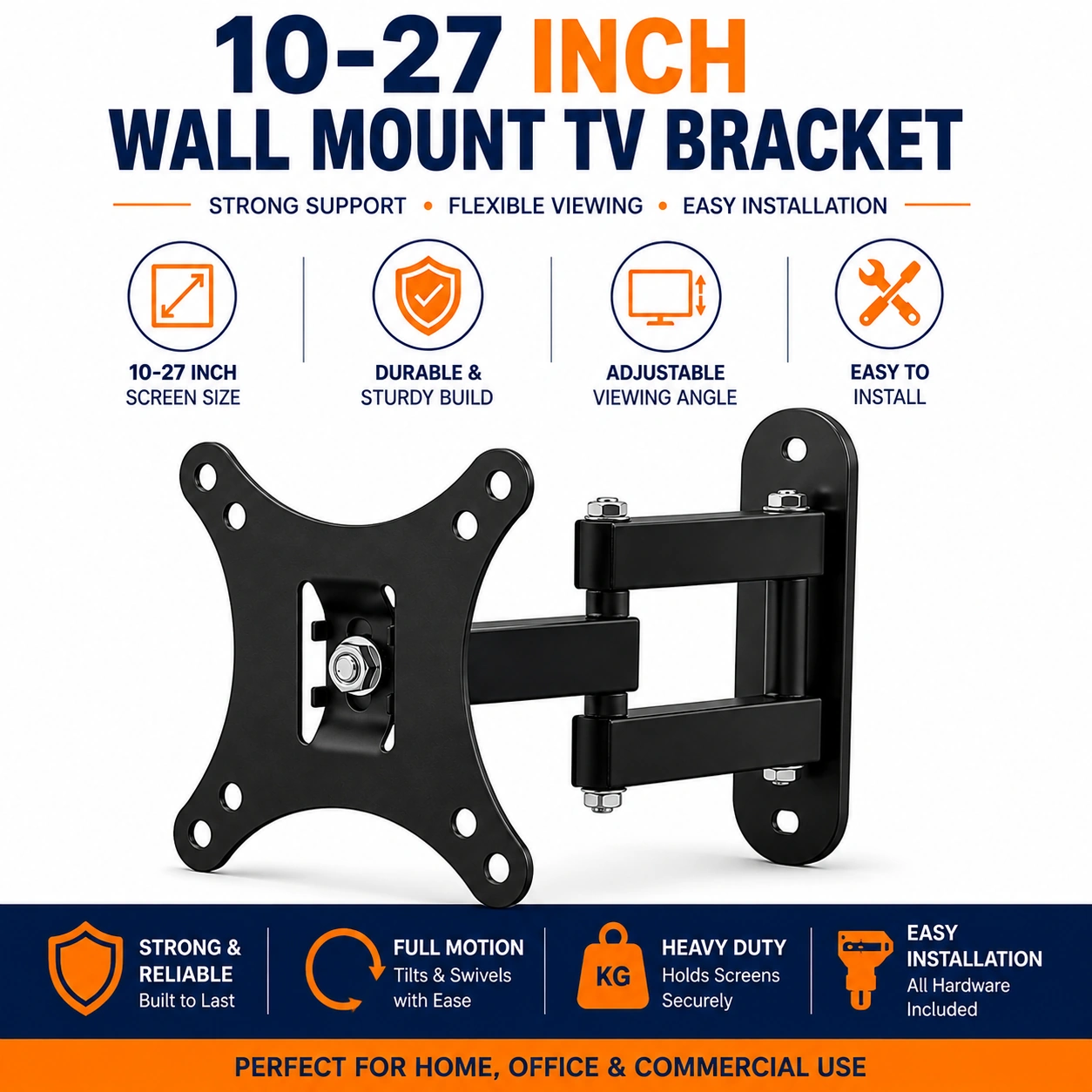
10 -27 Inch Small TV Wall Bracket for 10-27 Inch Screens Low Profile Articulating Arm Monitor Wall Bracket VESA 75/100, 180° Swivel, 15° Tilt, Max Extend 47CM for LCD/LED TVs Max Load Capacity 12Kgs -
10–27 Inch Small TV Wall Bracket with Articulating Arm
Create a flexible and space-saving screen setup with this practical 10–27 inch TV and monitor wall bracket. Designed for compatible LCD and LED screens, the bracket supports VESA 75 × 75mm and 100 × 100mm mounting patterns and has a stated maximum load capacity of 12kg, approximately 27lb.
The articulating arm provides flexible viewing adjustment with up to 180° swivel, 15° tilt and a maximum extension of approximately 47cm. This allows compatible screens to be moved away from the wall, angled towards different seating positions and repositioned for more convenient viewing.
Suitable for small televisions and monitors in bedrooms, kitchens, offices, studies and other suitable spaces, the bracket combines a compact wall-mounted design with adjustable positioning. Always confirm the screen size, total weight, VESA pattern and wall structure before installation.
Fits 10–27 Inch Screens
The bracket is designed for compatible 10 to 27 inch televisions and monitors. Screen size alone does not determine compatibility, so the VESA pattern and total screen weight should also be checked before mounting.
12kg Maximum Load Capacity
The mount is specified to support compatible screens weighing up to 12kg, approximately 27lb. Never exceed the stated maximum load capacity.
VESA 75 × 75mm & 100 × 100mm
Compatible with screens using 75 × 75mm or 100 × 100mm VESA mounting patterns. Measure the horizontal and vertical distance between the mounting holes on the rear of your screen before installation.
Articulating Arm Design
The adjustable arm allows the screen to be repositioned after installation, providing greater viewing flexibility than a fixed wall mount.
180° Swivel Adjustment
The bracket is specified with up to 180° swivel movement, allowing compatible screens to be angled left or right according to the installation position and available clearance.
15° Tilt Adjustment
The 15° tilt function provides additional vertical viewing adjustment, helping position the screen more comfortably and reduce unsuitable viewing angles.
Maximum 47cm Extension
The articulating arm can extend up to approximately 47cm from the wall, giving users greater freedom to position a compatible television or monitor when required.
Low Profile Wall Mounting
The bracket provides a compact wall-mounted solution that helps reduce the need for a large television stand or monitor base while keeping suitable floor and desk areas clearer.
LCD & LED Screen Compatibility
Designed for compatible LCD and LED televisions and monitors that meet the stated screen-size, VESA and weight requirements.
Ideal for Small TVs & Monitors
The compact mounting format makes the bracket particularly useful for smaller screens installed in bedrooms, kitchens, offices, studies, workshops and other suitable areas.
Flexible Viewing Position
Swivel, tilt and extension adjustment allow the screen position to be changed according to seating position, desk arrangement or room layout.
Space-Saving Installation
Wall mounting can help free up desk, shelf or cabinet space by removing the need to position the screen directly on a furniture surface.
Check Screen Compatibility
Before installation, confirm that your television or monitor is within the 10–27 inch range, weighs no more than 12kg and uses either 75 × 75mm or 100 × 100mm VESA mounting holes.
Check Rear Clearance
Make sure the mounting plate does not obstruct power sockets, connection ports, ventilation openings or other important components on the rear of the screen.
Secure Wall Installation
The bracket must be fixed to a wall structure capable of safely supporting the combined weight of the mount and screen. Use fixings appropriate for the specific wall type and seek professional installation assistance if uncertain.
Balanced Screen Positioning
After installation, adjust the screen carefully and make sure all mounting points and adjustment joints remain secure before regular use.
Routine Safety Checks
Periodically inspect the wall fixings, mounting screws, arm joints and screen attachment points for looseness or visible wear, particularly if the bracket is adjusted frequently.
Practical Small Screen Mounting Solution
Combining 10–27 inch screen compatibility, 12kg load capacity, VESA 75 × 75mm and 100 × 100mm support, 180° swivel, 15° tilt and up to 47cm extension, this articulating wall bracket provides a flexible solution for mounting compatible small televisions and monitors.
Package Information
Package Weight: 760 grams
Package Dimensions: 25 × 19 × 4.7 cm
Carton Information
Pieces in Carton: 20
Carton Net Weight: 15.80 kg
Carton Gross Weight: 16.80 kg
Carton Dimensions: 46.00 × 27.00 × 39.00 cm
Why Choose SAMTEK?
SAMTEK offers practical television and monitor mounting accessories designed to support organised and flexible screen installations. With an emphasis on adjustable viewing, space-saving mounting, secure compatibility and practical everyday use, SAMTEK provides useful solutions for homes, offices and workspaces.
About this item
- Universal TV Wall Bracket: Designed to fit 10–27 inch LCD, LED, and monitor screens , providing a secure and space-saving wall mounting solution.
- Compatible with VESA 75x75 & 100x100mm: Supports VESA 75x75mm and 100x100mm mounting patterns for broad compatibility with small TVs and monitors.
- Full Motion Articulating Arm: Flexible articulating arm allows effortless positioning for improved viewing angles and enhanced comfort.
- 180° Swivel Function: Smooth swivel adjustment allows you to direct your TV or monitor towards your preferred viewing position.
- 15° Tilt Adjustment: Adjustable tilt helps minimise screen glare while improving viewing comfort from different seating positions.
- Extends Up to 47cm: Maximum extension of 47cm provides excellent flexibility while allowing the screen to be pulled away from the wall when required.
- Supports up to 12kg: Heavy-duty steel construction safely supports TVs and monitors weighing up to 12kg (27lbs) .
- Heavy-Duty Steel Construction: Manufactured from premium steel for excellent durability, stability, and reliable long-term performance.
- Space-Saving Low Profile Design: Keeps your TV close to the wall when retracted, creating a clean and modern entertainment setup.
- Smooth Viewing Adjustments: Easily extend, retract, swivel, and tilt your screen for the ideal viewing position throughout the day.
- Ideal for TVs & Monitors: Suitable for LCD TVs, LED TVs, computer monitors, CCTV displays, gaming screens, and small digital displays.
- Perfect for Home & Office: Ideal for bedrooms, kitchens, offices, study rooms, gaming setups, reception areas, classrooms, and workshops.
- Easy Installation: Includes mounting hardware for quick and straightforward installation on suitable solid walls.
- Cable Management Friendly: Adjustable arm design helps route cables neatly behind the display for a cleaner appearance.
- Improves Viewing Comfort: Full motion adjustment reduces neck strain by allowing the screen to be positioned at the ideal angle.
- Reliable Everyday Performance: Engineered to provide secure support and smooth movement for daily use.
- Ideal for Entertainment & Work: Perfect for watching TV, gaming, video conferencing, streaming, studying, and professional workstations.
- Compact Yet Strong: Small wall bracket offers maximum flexibility while maintaining excellent structural strength and stability.
- Suitable for Multiple Screen Brands: Compatible with most 10–27 inch televisions and monitors supporting VESA 75x75mm or 100x100mm mounting patterns.
- Complete TV Mounting Solution: Combining compatibility with 10–27 inch screens , a 180° swivel , 15° tilt , 47cm articulating extension , 12kg load capacity , heavy-duty steel construction, and VESA 75x75mm & 100x100mm support, this TV wall bracket provides a secure, flexible, and space-saving mounting solution for home and office use.
For custom volume pricing or bulk orders, request a formal quote.
Currently Out of Stock
Direct purchasing is currently disabled for this item. Request a formal quotation below.
| Seller | eBuyerhub Store |
| How to use | 1. Check TV Compatibility Before Installation Before mounting, ensure your television or monitor is compatible with the bracket. It is designed for screens between 10 and 27 inches with VESA mounting patterns of 75 × 75 mm or 100 × 100 mm and a maximum weight capacity of 12 kg (27 lbs). Verify that the mounting holes on the back of your TV match the supplied hardware. 2. Install the Wall Plate Securely Choose a solid wall or suitable mounting surface capable of supporting both the bracket and the television. Mark the fixing points, drill the holes if required, insert appropriate wall plugs, and securely fasten the wall plate using the supplied screws. Double-check that the wall plate is level before tightening all fixings. 3. Attach the Mounting Plate to the TV Using the correct VESA screws, attach the mounting plate securely to the back of your television or monitor. Tighten the screws evenly without overtightening to avoid damaging the mounting threads. Ensure the bracket is firmly attached before lifting the screen. 4. Mount the Television onto the Bracket Carefully lift the television and hook it onto the wall bracket according to the installation instructions. Make sure the locking mechanism or safety screws are fully engaged before releasing the TV. If necessary, ask another person to assist during installation for added safety. 5. Adjust the Viewing Position Use the articulating arm to extend the TV up to 47 cm from the wall, swivel it up to 180°, and tilt it up to 15° to achieve the most comfortable viewing angle. Once the desired position has been reached, ensure all adjustment points remain secure for stable operation. 6. Organise Cables and Clean the Bracket Connect the required power and AV cables, arranging them neatly to prevent tangling or strain during movement. Periodically wipe the wall bracket and articulating arm with a soft, dry cloth to remove dust and keep the mechanism operating smoothly. 7. Inspect the Bracket Regularly Check the wall fixings, mounting screws, swivel joints, tilt mechanism, and extension arm on a regular basis. Tighten any loose hardware and inspect for signs of wear or damage to ensure the bracket continues to provide safe and reliable support. 8. Maintain for Long-Term Performance Avoid exceeding the maximum load capacity or forcing the bracket beyond its intended range of movement. Regular cleaning, periodic inspection, and correct use will help maintain smooth operation, secure support, and long-lasting performance for your TV wall mount. |