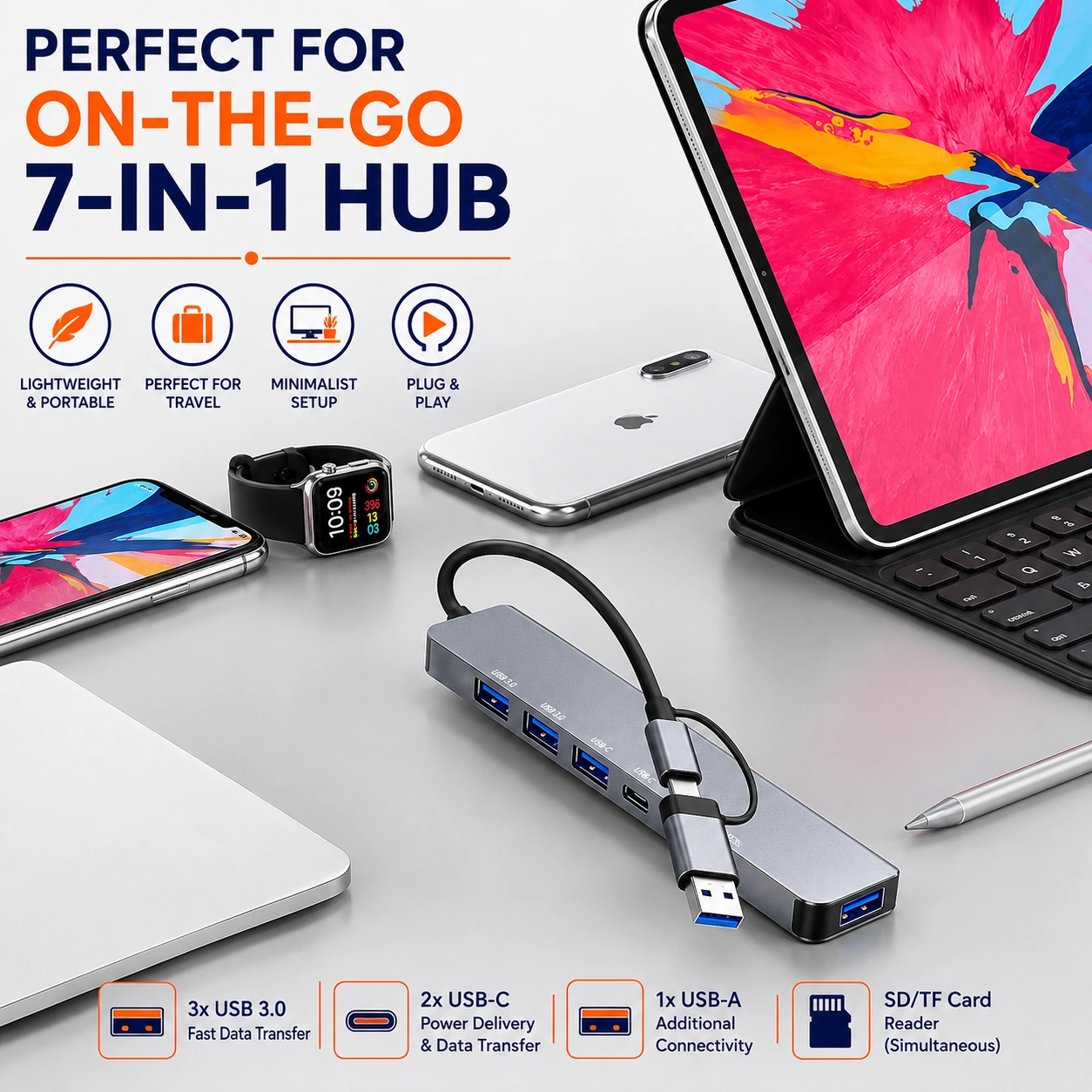
7 in 1 USB C Hub, USB Splitter Multiport Adapter with USB A & USB C Ports for Laptop, MacBook, PS5, PS4, Nintendo Switch, Printer, USB Fan & Flash Drive
7 in 1 USB-C Hub Multiport Adapter for Laptop & Gaming Devices
Expand the connectivity of compatible devices with this practical 7 in 1 USB-C hub. Designed as a compact multiport splitter, the adapter provides a convenient selection of USB-A and USB-C ports for connecting suitable accessories such as flash drives, printers, USB fans and other compatible peripherals.
The lightweight multiport design is suitable for compatible laptops, MacBooks, PS5, PS4, Nintendo Switch and other devices that support the required USB-C connection and accessory functions. It provides a simple way to organise several compatible USB devices through one compact hub instead of repeatedly disconnecting and reconnecting accessories.
With compact dimensions of approximately 10.00 × 4.00 × 1.50 cm, the hub is convenient for desks, home offices, gaming setups, workstations and travel bags.
7 in 1 Multiport Design
The hub provides a stated 7 in 1 connectivity design, allowing multiple compatible USB accessories to be connected through one compact adapter.
USB-C Connection
Designed for compatible devices with a suitable USB-C connection, the hub helps expand available ports for everyday peripherals and accessories.
USB-A & USB-C Ports
The adapter includes both USB-A and USB-C connectivity, providing flexible support for a range of compatible modern and traditional USB accessories.
Suitable for Laptops & MacBooks
Use the hub with compatible laptops and MacBooks to connect supported USB accessories where additional ports are required for work, study or general everyday use.
Gaming Console Compatibility
The hub is described as suitable for compatible PS5, PS4 and Nintendo Switch setups. Actual peripheral support depends on the console, USB mode and accessory being connected.
Connect Flash Drives
Compatible USB flash drives can be connected through suitable ports for convenient access to supported files and storage functions.
Printer Connectivity
The adapter can be used with compatible USB printers where the host device and printer support the required USB connection and software configuration.
Convenient Port Expansion
The hub helps increase the number of accessible USB connections on compatible devices, making it useful when built-in ports are limited or already occupied.
Compact Desk Accessory
Its compact size helps keep workstation setups organized without taking up excessive desk space, making it suitable for offices, study areas and gaming desks.
Portable Travel Design
The lightweight format makes the hub easy to carry in suitable laptop bags, backpacks and travel organisers for work, study or entertainment away from home.
Useful for Home & Office
Use the hub to connect compatible peripherals around home workstations, office desks, study setups and other areas where extra USB ports may be useful.
Simple Plug-In Connectivity
Connect the hub to a compatible USB-C host device and then attach supported accessories to the appropriate ports according to the device and accessory instructions.
Organised Peripheral Setup
Using one hub for several compatible accessories can help reduce repeated cable swapping and create a cleaner, more organised workstation or gaming setup.
Compatibility Considerations
Not every USB-C port supports the same functions. Check that the host device supports the required data, power or peripheral function before connecting specific accessories.
Power Requirements
Some accessories may require more power than a host USB port can provide. Avoid connecting multiple high-power devices unless the hub and host system are specifically designed to support the combined load.
Safe Connection & Removal
Insert and remove USB connectors gently without excessive force. When using storage devices, follow the operating system's safe-eject procedure where appropriate before disconnecting them.
Protect from Moisture & Heat
Keep the hub and connectors dry and away from excessive heat, liquids and direct exposure to moisture. Stop using the adapter if the housing, cable or connectors become visibly damaged.
Cleaning & Care
Disconnect the hub before cleaning and wipe the exterior with a soft, dry cloth. Avoid inserting metal objects or cleaning liquids into the USB ports.
Storage Guidance
Store the adapter in a clean, dry location and protect the ports and cable from crushing, excessive bending and impact when transporting it in a bag or case.
Practical Multi-Device Connectivity Solution
Combining a 7 in 1 design, USB-A and USB-C connectivity, compact construction and compatibility with a range of suitable laptops, gaming devices and peripherals, this USB-C hub provides a practical way to expand everyday connectivity at home, work or while travelling.
Package Information
Package Weight: 130 grams
Package Dimensions: 10.00 × 4.00 × 1.50 cm
Carton Information
Pieces in Carton: 110
Carton Net Weight: 14.30 kg
Carton Gross Weight: 15.00 kg
Carton Dimensions: 50.00 × 40.00 × 34.50 cm
Why Choose SAMTEK?
SAMTEK offers practical computer, gaming and connectivity accessories designed to simplify everyday device setups. With an emphasis on compact portability, flexible connectivity, convenient multiport expansion and straightforward everyday use, SAMTEK provides useful solutions for home, office, study and entertainment environments.
About this item
- 7-in-1 USB C Hub: Multiport USB adapter designed to expand connectivity from a compatible USB-C device, providing a practical solution for connecting multiple suitable USB accessories and peripherals.
- USB A & USB C Ports: Features both USB-A and USB-C connectivity, helping users connect a wider variety of compatible modern and traditional USB devices through one convenient hub.
- Multiport USB Splitter: The 7-in-1 design provides multiple connection options in one compact adapter, reducing the need to repeatedly disconnect accessories when using compatible devices.
- Laptop Connectivity: Suitable for compatible USB-C laptops where additional USB connections are needed for peripherals, storage devices, accessories, and everyday workspace equipment.
- MacBook Compatible: Designed for use with compatible MacBook models featuring a suitable USB-C connection, helping expand available ports for everyday accessories and peripherals.
- PS5 Compatibility: Suitable for connecting compatible USB accessories to PlayStation 5 consoles where the device and accessory combination supports hub-based USB connectivity.
- PS4 Compatibility: Can be used with compatible PlayStation 4 setups to provide additional USB connectivity for suitable peripherals and accessories.
- Nintendo Switch Support: Suitable for compatible Nintendo Switch configurations where USB hub connectivity is supported, providing a convenient way to connect suitable USB accessories.
- Printer Connection: Useful for connecting compatible USB printers to suitable laptops or devices through the hub, helping create a more organised work or home-office setup.
- USB Fan Connectivity: Supports compatible USB-powered fan connections, making it convenient to add suitable desk or personal cooling accessories to an existing USB setup.
- Flash Drive Support: Connect compatible USB flash drives for convenient access to stored files, documents, photos, videos, and other digital content through a suitable host device.
- Workstation Expansion: A practical accessory for desks and home offices where laptops need additional USB connections for storage, printers, accessories, and other compatible peripherals.
- Gaming Setup Accessory: Suitable for compatible console and gaming arrangements where extra USB connectivity is useful for supported accessories and peripheral devices.
- Multiple Device Connections: The multiport layout helps organise several compatible USB accessories through one hub, making everyday laptop, gaming, and desk setups more convenient.
- Compact Connectivity Solution: Combines multiple USB ports into one adapter, helping minimise the need to carry several individual splitters or connection accessories.
- USB-C Host Connection: Designed to connect through a compatible USB-C interface, providing an easy way to expand the number and variety of available USB connections.
- Home & Office Use: Ideal for workstations, study areas, home offices, shared desks, and other environments where several compatible USB devices may need to be connected.
- Travel-Friendly Adapter: The all-in-one multiport format makes the hub practical for carrying with laptops and other compatible devices during business trips, study, commuting, or travel.
- Check Device Compatibility: Confirm that the host device supports USB-C hub connectivity and that individual peripherals are compatible with the relevant platform before use, as supported functions may vary by device.
- Complete 7-in-1 USB C Hub Solution: Combining a 7-in-1 multiport design, USB-A and USB-C connections, compact USB splitter functionality, and broad compatible-device support , this adapter is ideal for laptops, MacBooks, PS5, PS4, Nintendo Switch, printers, USB fans, flash drives, home offices, gaming setups, travel, and everyday peripheral connectivity .
For custom volume pricing or bulk orders, request a formal quote.
Currently Out of Stock
Direct purchasing is currently disabled for this item. Request a formal quotation below.
| Seller | eBuyerhub Store |
| How to use | 1. Unpack and Inspect the USB-C Hub Carefully remove the 7-in-1 USB-C hub from the packaging and inspect the USB-C connector, USB-A ports, USB-C ports, cable and casing for bends, cracks, looseness or other visible damage before connecting it to any device. 2. Connect the Hub to Your Device Insert the hub's USB-C connector securely into a compatible USB-C port on your laptop, MacBook, PS5, PS4, Nintendo Switch or other supported device. Avoid forcing the connector and make sure it is fully seated before attaching accessories. 3. Connect USB-A Accessories Use the available USB-A ports to connect compatible devices such as flash drives, printers, USB fans, keyboards, mice or other suitable accessories. Insert each plug straight into the correct port to avoid damaging the connectors. 4. Use the USB-C Ports Connect compatible USB-C accessories to the available USB-C ports according to their intended function. Check that the connected device is recognised correctly and avoid assuming every port supports charging, video or high-speed data unless specified for that particular port. 5. Connect Multiple Devices Carefully Use the multiport adapter to connect several compatible peripherals at the same time where supported. If a connected device is not detected or operates inconsistently, disconnect unnecessary accessories and reconnect them one at a time to identify the cause. 6. Use with Consoles and Computers When using the hub with a laptop, MacBook or compatible games console, connect only accessories supported by that system. Some devices may require specific settings, drivers, adapters or system support before printers, storage devices or other peripherals can operate correctly. 7. Disconnect Devices Safely Before removing a flash drive or storage device, use the operating system's safe-eject function where available to reduce the risk of data loss. Hold the plug rather than pulling the cable and avoid disconnecting devices while files are being transferred. 8. Clean and Store the Hub Disconnect the hub before cleaning and wipe the casing gently with a soft, dry cloth. Keep liquids and debris away from all ports, inspect the connectors regularly and store the adapter in a clean, dry place where the cable and plugs will not be bent, crushed or damaged. |