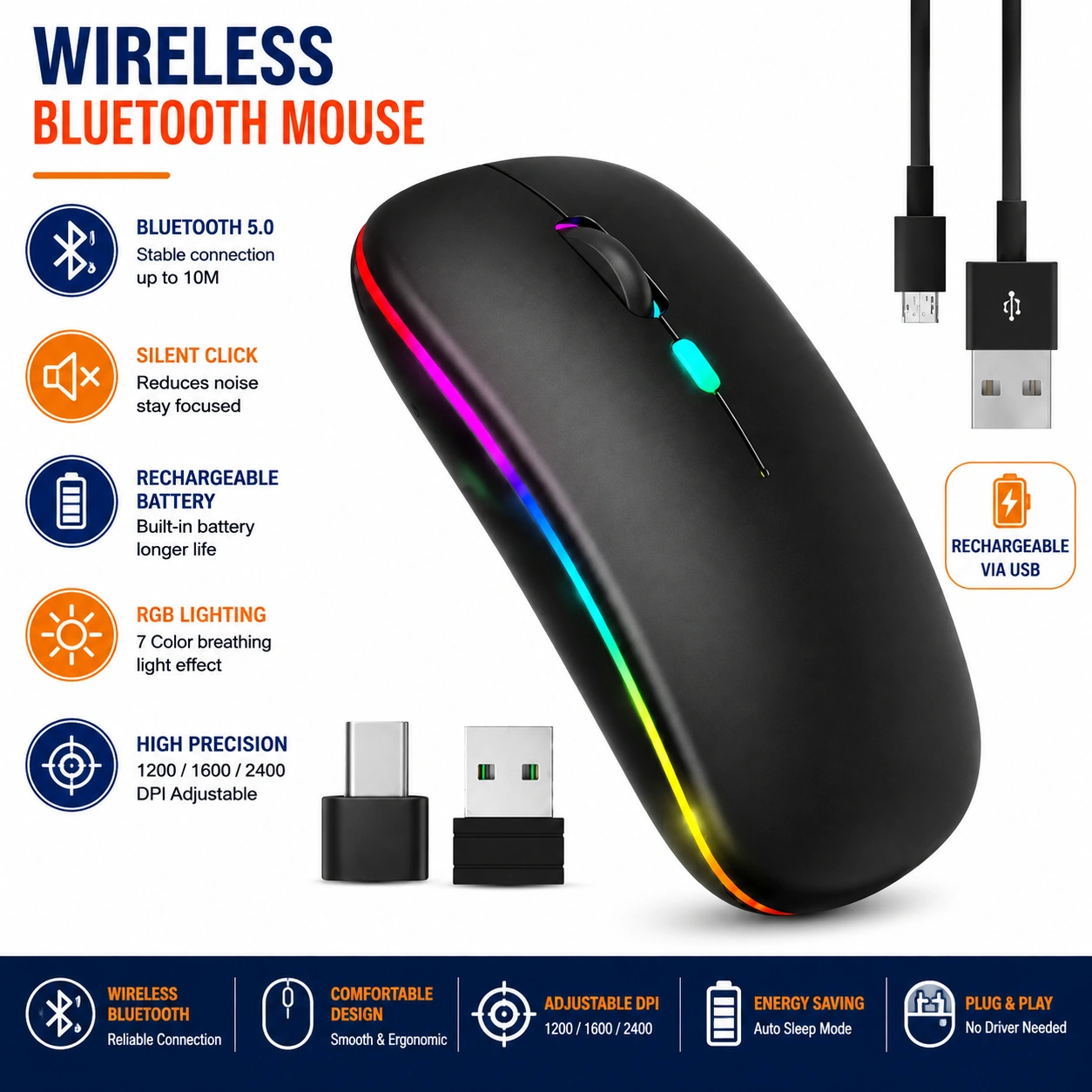
Wireless Bluetooth Mouse, Rechargeable Dual Mode 2.4GHz USB Mouse with RGB Lights, Adjustable 800–2400 DPI
Rechargeable Dual Mode Wireless Bluetooth Mouse
Upgrade everyday computer control with this practical wireless Bluetooth mouse with dual-mode connectivity. Designed for laptops, desktop computers, PCs and other compatible devices, the mouse supports both Bluetooth and 2.4GHz USB wireless connection, providing flexible cordless operation for home, office, study and travel use.
The mouse features an adjustable sensitivity range of 800–2400 DPI, allowing users to select a suitable cursor speed for browsing, document work, spreadsheets, general productivity and other compatible applications. Integrated RGB lighting adds a modern visual effect to the compact design.
A built-in rechargeable power system provides convenient repeated use without relying solely on disposable batteries. Its slim and portable format makes the mouse practical for computer bags, workstations, home offices and everyday mobile computing setups.
Dual Mode Wireless Connectivity
The mouse supports Bluetooth and 2.4GHz wireless modes, allowing users to select a connection method according to the compatible device and available interface.
2.4GHz USB Mouse Mode
Use the 2.4GHz wireless connection with the appropriate USB receiver and a compatible computer for straightforward cordless mouse operation.
Bluetooth Mouse Connection
Bluetooth mode provides an alternative wireless connection for compatible devices, helping reduce dependence on a USB port where Bluetooth mouse support is available.
Rechargeable Design
The integrated rechargeable power system allows the mouse to be recharged for repeated use, providing a convenient alternative to frequently replacing disposable batteries.
800–2400 DPI Adjustment
Adjust the cursor sensitivity between the supported 800–2400 DPI range to suit different screen sizes, applications and personal control preferences.
Flexible Cursor Sensitivity
Lower sensitivity settings can provide more controlled cursor movement, while higher settings allow faster movement across larger displays or work areas.
RGB Lighting
Integrated RGB lights add a colourful modern visual effect, making the mouse suitable for contemporary desk, gaming-inspired and home-office setups.
Cordless Desk Setup
Wireless operation helps reduce unnecessary mouse cables across the desk, creating a cleaner and more flexible computer workspace.
Laptop Companion
The compact design makes the mouse useful with compatible laptops at home, in offices, classrooms and while travelling between work or study locations.
Desktop & PC Use
Use the mouse with compatible desktop computers and PCs for browsing, documents, spreadsheets and general everyday computer control.
Office Productivity
The adjustable DPI and wireless design make the mouse practical for emails, presentations, spreadsheets, web browsing and other routine office applications.
Home & Study Use
Suitable for homework, online learning, browsing and general household computing, the mouse provides convenient cordless control for compatible devices.
Portable Slim Design
Its compact format makes the mouse easy to place inside a laptop bag, backpack or computer accessory case for use away from a permanent workstation.
Easy Connection Setup
Select the required Bluetooth or 2.4GHz mode and follow the compatible device's connection procedure. For USB mode, insert the appropriate receiver into a suitable USB port before use.
Convenient Everyday Switching
Dual-mode functionality provides added flexibility when moving between compatible devices or computer setups with different wireless connection options.
Charging Guidance
Recharge the mouse using the appropriate connection and power source specified for the product. Avoid using damaged charging cables or unsuitable high-power adapters.
Cleaning & Maintenance
Wipe the mouse with a soft dry or lightly damp cloth when required. Keep the sensor, charging port and controls free from dust, liquids and debris.
Safe Storage
Store the mouse in a clean, dry place away from excessive heat, moisture and heavy objects that could damage the housing or internal components.
Compatibility Guidance
Wireless functionality depends on the Bluetooth and USB capabilities of the connected device. Confirm compatibility with the intended computer or operating system before use.
Complete Wireless Mouse Solution
Combining Bluetooth and 2.4GHz dual-mode connectivity, rechargeable operation, RGB lighting and adjustable 800–2400 DPI sensitivity, this wireless mouse provides a practical solution for laptops, desktops, PCs, home offices and everyday computer use.
Package Information
Package Weight: 80 grams
Package Dimensions: 11.2 × 5.8 × 2.5 cm
Carton Information
Pieces in Carton: 180
Carton Net Weight: 14.00 kg
Carton Gross Weight: 15.00 kg
Carton Dimensions: 56.00 × 35.00 × 15.00 cm
Why Choose ATEK?
ATEK offers practical computer and office accessories designed to support convenient everyday productivity. With an emphasis on wireless flexibility, rechargeable operation and modern compact designs, ATEK provides useful solutions for home, study, office and mobile computer setups.
About this item
- Bluetooth & 2.4GHz Dual Mode: Enjoy flexible wireless connectivity with both Bluetooth and 2.4GHz wireless modes, allowing convenient connection to compatible laptops, computers, and other devices.
- Rechargeable Wireless Mouse: Built-in rechargeable battery eliminates the need for regular battery replacement, providing a convenient and economical solution for everyday computer use.
- Adjustable 800-2400 DPI: Choose from adjustable DPI levels between 800 and 2400 to customise cursor sensitivity for browsing, office work, creative tasks, and general computer use.
- RGB LED Lighting: Stylish RGB lighting adds an attractive modern look to your desktop setup, making the mouse a great choice for gaming stations, home offices, and computer workspaces.
- Smooth Optical Tracking: Optical tracking technology provides responsive and accurate cursor movement for everyday navigation, document editing, browsing, and other computer tasks.
- Convenient Wireless Operation: Enjoy a clutter-free desktop without the restriction of a traditional wired mouse, providing greater freedom of movement around your workspace.
- Ideal for Laptops: Compact wireless design makes it a practical accessory for laptops, notebooks, and portable computers at home, in the office, or while travelling.
- Suitable for PC & Computer Use: Designed for everyday use with compatible desktop computers and laptops, making it suitable for work, study, browsing, entertainment, and general productivity.
- Ergonomic Comfortable Shape: Designed with a comfortable shape that fits naturally in the hand, helping provide a more pleasant experience during extended periods of computer use.
- Rechargeable Convenience: Rechargeable functionality helps reduce the hassle of constantly replacing disposable batteries, making it a practical choice for frequent daily use.
- Multiple DPI Settings: Adjustable sensitivity gives you greater control over cursor speed, allowing you to select a setting that suits different applications and personal preferences.
- Portable & Travel Friendly: Lightweight wireless design is easy to carry in a laptop bag, backpack, or computer case, making it ideal for mobile working and travelling.
- Modern Desktop Accessory: Combines dual-mode wireless connectivity, rechargeable power, adjustable DPI, optical tracking, and RGB lighting for a stylish and practical computer accessory.
- Easy Wireless Setup: Designed for convenient wireless connection, helping reduce cable clutter and making it simple to use with compatible devices.
- Suitable for Home & Office: Perfect for home offices, workplaces, study desks, libraries, schools, and other environments where comfortable wireless computer control is required.
- Great for Work & Study: Ideal for browsing websites, working with documents, preparing presentations, attending online sessions, and completing everyday computer tasks.
- Ideal for Gaming Setups: RGB lighting and adjustable DPI make this wireless mouse a stylish addition to compatible gaming desks and computer setups, while remaining suitable for general use.
- Reliable Everyday Performance: Designed to provide responsive cursor control and convenient wireless operation for regular computer use at home, work, or while travelling.
- Wide Application: Suitable for compatible laptops, PCs, desktop computers, office workstations, home setups, study areas, gaming desks, and portable working environments.
- Complete Wireless Mouse Solution: Combining Bluetooth and 2.4GHz dual-mode connectivity , rechargeable battery operation, adjustable 800-2400 DPI , optical tracking, RGB LED lighting, ergonomic design, and portable wireless convenience, this mouse is ideal for laptops, PCs, computers, office work, home use, studying, browsing, travel, and gaming setups .
For custom volume pricing or bulk orders, request a formal quote.
Currently Out of Stock
Direct purchasing is currently disabled for this item. Request a formal quotation below.
| Seller | eBuyerhub Store |
| How to use | 1. Charge the Wireless Mouse Before first use, connect the rechargeable wireless mouse to a suitable USB power source using the charging cable. Allow the internal battery to charge sufficiently before disconnecting it. The mouse can then be used without the need for disposable batteries, making it convenient for everyday work, study, browsing, or gaming. 2. Choose the Connection Mode Select either Bluetooth or 2.4GHz wireless mode according to your device and preference. For 2.4GHz connection, insert the compatible USB receiver into an available USB port on your laptop or computer. For Bluetooth use, activate Bluetooth on your compatible device and follow the mouse pairing instructions to establish a wireless connection. 3. Adjust the DPI Setting Use the DPI control to select the preferred cursor sensitivity between 800 and 2400 DPI, depending on your activity. Choose a lower DPI for more precise cursor movements and detailed tasks, or increase the DPI when faster pointer movement is preferred for browsing, larger screens, or gaming. 4. Use the Mouse Normally Place the mouse on a suitable flat surface and move it smoothly to control the cursor. Use the left and right buttons, scroll wheel, and other available controls for everyday computer tasks. The dual-mode wireless design allows convenient use with compatible laptops, computers, and other supported devices. 5. Use the RGB Lighting Activate the RGB lighting feature if you want to add colourful illumination to your setup. Use the available lighting controls, if provided, to select or adjust the lighting effect according to your preference. Turn the lighting off when not required to help conserve battery power. 6. Recharge When the Battery Is Low Recharge the mouse when the battery level becomes low or when the device stops responding due to insufficient power. Connect it to a suitable USB charging source and allow it to recharge before returning to wireless operation. Avoid storing the mouse completely discharged for long periods. 7. Clean and Inspect Regularly Switch off the mouse before cleaning and wipe the surface with a soft, dry cloth to remove dust, fingerprints, and dirt. Keep the sensor area, buttons, scroll wheel, charging port, and USB receiver free from debris. Regularly inspect the charging cable and wireless receiver for signs of damage or excessive wear. 8. Store Safely After Use Turn off the mouse when it is not being used for an extended period to help preserve battery life. Store it in a cool, dry location away from direct sunlight, moisture, excessive heat, and heavy objects. Keep the USB receiver and charging cable together with the mouse so they are readily available for future use. |