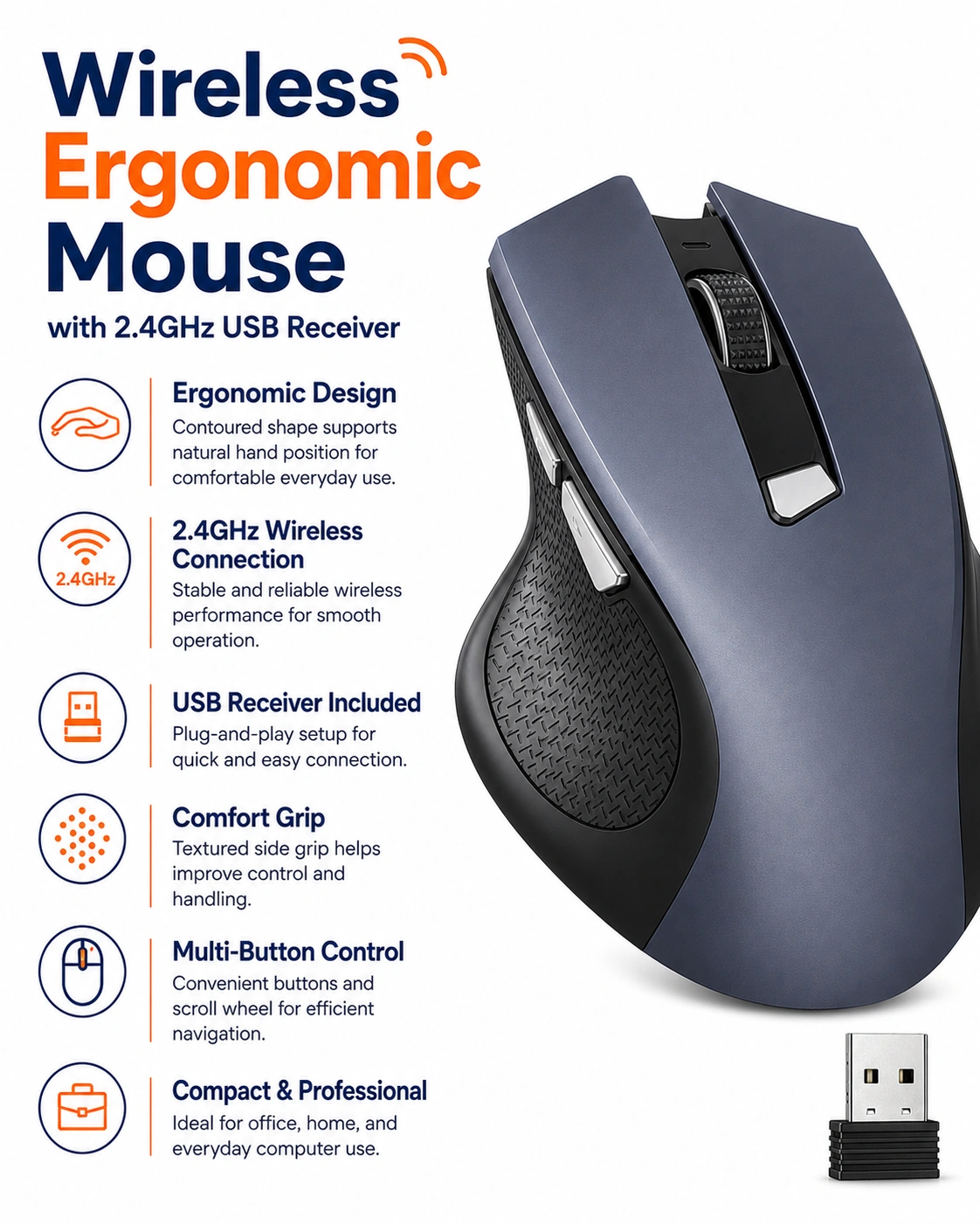
Wireless Ergonomic Mouse with 2.4GHz USB Receiver, 3 Adjustable DPI Levels, 6 Button Cordless Optical Mouse with Battery Indicator for Laptop, Desktop, PC & Office Use
2.4GHz Wireless Ergonomic Optical Mouse
Improve everyday computer control with this practical wireless ergonomic mouse with 2.4GHz USB receiver. Designed for laptops, desktop computers, PCs and office workstations, the cordless optical mouse provides convenient cable-free operation together with adjustable sensitivity and multiple control buttons.
The mouse features 3 adjustable DPI levels, allowing users to select a suitable cursor sensitivity for different tasks such as browsing, document work, spreadsheets and general computer use. Its 6-button layout provides additional control options for compatible operating systems and applications.
An integrated battery indicator helps users monitor battery status, while the supplied 2.4GHz USB receiver provides wireless connectivity with compatible computers. The ergonomic body is designed for comfortable everyday handling during home, study and office use.
2.4GHz Wireless Connection
The mouse uses a 2.4GHz wireless connection through the supplied USB receiver, helping reduce desktop cable clutter while providing convenient cordless computer control.
USB Receiver Included
A compact USB receiver is included for connection to compatible laptops and desktop computers with a suitable USB port.
3 Adjustable DPI Levels
Choose between 3 DPI sensitivity levels to adjust cursor movement according to personal preference and the task being performed.
6 Button Control Layout
The mouse features a practical 6-button design that provides additional control options compared with a basic three-button mouse, subject to software and operating-system compatibility.
Ergonomic Shape
The contoured body is designed to support a comfortable hand position during routine browsing, office work and general computer use.
Cordless Desktop Setup
Wireless operation helps create a cleaner workspace by eliminating the need for a permanent mouse cable across the desk.
Optical Tracking
The optical tracking system provides responsive cursor movement on suitable surfaces for everyday computing, browsing and productivity tasks.
Battery Indicator
The integrated battery indicator provides a useful visual reference for battery status, helping users identify when replacement or charging may be required depending on the battery system used.
Ideal for Laptop Use
The compact wireless design makes the mouse useful with compatible laptops at home, in the office, during study sessions or while travelling between work locations.
Desktop & PC Compatibility
Use the mouse with compatible desktop computers and PCs equipped with a suitable USB connection for the supplied wireless receiver.
Office Productivity
The adjustable sensitivity and multi-button design make the mouse practical for emails, web browsing, spreadsheets, documents and other routine office applications.
Home & Study Use
The wireless mouse is also suitable for home computing, homework, online learning and general internet use where comfortable cordless control is preferred.
Adjustable Cursor Sensitivity
Switching between the available DPI levels allows users to balance slower precision movement with faster cursor travel according to screen size and individual preference.
Portable Computer Accessory
Its compact cordless format makes the mouse easy to carry in a laptop bag or computer accessory case for use between home, office and study locations.
Simple Everyday Setup
Insert the supplied USB receiver into a compatible computer, ensure the mouse has suitable battery power and activate the device according to its operating controls.
Receiver Care
Keep the small USB receiver in a secure location when it is not connected to a computer. Avoid bending, crushing or exposing the receiver to moisture.
Cleaning & Maintenance
Wipe the mouse with a soft dry or lightly damp cloth when required. Keep the optical sensor, buttons and battery compartment free from dust, liquids and debris.
Important Usage Guidance
Use the mouse and receiver only with compatible equipment. Avoid dropping the device, exposing it to excessive moisture or forcing the USB receiver into an unsuitable port.
Complete Wireless Mouse Solution
Combining a 2.4GHz USB wireless connection, 3 adjustable DPI levels, 6-button layout, optical tracking, ergonomic design and battery indicator, this cordless mouse provides a practical solution for laptop, desktop, PC, home and office use.
Package Information
Package Weight: 0.06 kg
Package Dimensions: 10.50 × 7.00 × 3.70 cm
Carton Information
Carton Gross Weight: 7.00 kg
Carton Dimensions: 52.00 × 22.50 × 38.00 cm
Why Choose STEK?
STEK offers practical computer and office accessories designed to support convenient everyday productivity. With an emphasis on wireless functionality, ergonomic handling and straightforward operation, STEK provides useful solutions for home, study and professional computer setups.
About this item
- Wireless Ergonomic Mouse: Designed with an ergonomic shape for comfortable everyday computer use, making it suitable for work, study, browsing, office tasks, and general laptop or desktop navigation.
- 2.4GHz Wireless Connection: Uses a 2.4GHz wireless connection with the included USB receiver, providing a convenient cordless setup for compatible laptops, desktop computers, PCs, and office workstations.
- USB Receiver Included: Supplied with a USB receiver for straightforward wireless connectivity, allowing the mouse to be paired with compatible computers that support the required USB connection.
- 3 Adjustable DPI Levels: Features three selectable DPI settings, allowing users to adjust cursor sensitivity according to personal preference, screen size, work type, or everyday navigation requirements.
- Adjustable Cursor Sensitivity: Multiple DPI levels provide greater control over pointer movement, making it easier to switch between more precise navigation and faster cursor movement when required.
- 6 Button Design: Equipped with six buttons to support practical computer navigation and everyday productivity, providing convenient control for compatible work, browsing, and general PC tasks.
- Cordless Optical Tracking: Optical tracking provides responsive cursor movement across suitable surfaces while the cordless design helps reduce cable clutter around desks and work areas.
- Battery Indicator: Includes a battery indicator to help users monitor remaining power status, providing a useful reminder when the mouse may require battery attention.
- Ideal for Laptop Users: A practical wireless mouse for compatible laptops, providing greater control and comfort than relying solely on a built-in touchpad during work or study sessions.
- Desktop & PC Compatibility: Suitable for compatible desktop computers and PCs with an available USB connection, making it useful for home offices, workplaces, study areas, and shared computer setups.
- Cable-Free Desk Setup: Wireless operation helps keep desks cleaner and more organised by eliminating the need for a mouse cable between the device and the computer.
- Practical Everyday Navigation: Suitable for browsing websites, selecting files, scrolling documents, working with office software, navigating menus, and carrying out routine computer tasks.
- Suitable for Work & Study: Useful for office professionals, students, home users, and anyone who needs a convenient cordless mouse for daily computer activities.
- Portable Wireless Mouse: The cordless design makes the mouse easy to move between suitable workspaces, making it practical for laptop bags, home offices, classrooms, and temporary desk setups.
- Flexible DPI Control: Three DPI options allow users to customise mouse responsiveness for different activities, helping create a more comfortable navigation experience across compatible screens and applications.
- Ergonomic Desktop Accessory: The shaped design provides a practical alternative to basic flat mice, making it suitable for regular use at desks, workstations, home offices, and study areas.
- Convenient USB Wireless Setup: The included receiver provides a simple way to connect the mouse to compatible devices without requiring a permanent wired connection across the desk.
- Versatile Computer Mouse: Suitable for compatible laptops, desktops, PCs, office computers, home workstations, and study setups requiring dependable cordless optical navigation.
- Complete Wireless Mouse Solution: Combining a 2.4GHz wireless connection, USB receiver, ergonomic design, three adjustable DPI levels, six-button layout, optical tracking, and battery indicator , this cordless mouse is ideal for laptops, desktop computers, PCs, offices, home working, study, browsing, document editing, and everyday computer use .
For custom volume pricing or bulk orders, request a formal quote.
Currently Out of Stock
Direct purchasing is currently disabled for this item. Request a formal quotation below.
| Seller | eBuyerhub Store |
| How to use | 1. Insert the Battery Open the battery compartment on the underside of the wireless mouse and insert the required battery according to the marked polarity. Close the compartment securely and check that the battery indicator and mouse casing show no visible damage before use. 2. Connect the USB Receiver Remove the 2.4GHz USB receiver from its storage position if applicable and insert it into an available USB port on your laptop, desktop, or PC. Allow the computer a few moments to recognise the receiver before operating the mouse. 3. Switch On the Mouse Move the power switch to the ON position where provided. Place the mouse on a suitable flat surface and move it gently to confirm that the cursor responds correctly on the screen. 4. Select a DPI Level Use the DPI button to cycle through the three available sensitivity levels. Choose a lower setting for precise cursor control or a higher setting for faster movement across the screen, depending on your working preference. 5. Use the Six Buttons Use the left and right buttons for standard clicking, the scroll wheel for navigating pages and documents, and the additional buttons for their supported functions. Keep your hand relaxed on the ergonomic shape during extended office or computer use. 6. Monitor the Battery Indicator Check the battery indicator periodically during use so you can replace the battery when power becomes low. If cursor response becomes weak or intermittent, inspect the battery condition and make sure the USB receiver remains securely connected. 7. Clean and Inspect Regularly Switch the mouse off before cleaning and wipe the outer casing, buttons, scroll wheel, and optical sensor area gently with a soft, dry or slightly damp cloth. Avoid allowing liquid to enter the mouse and regularly check the USB receiver and battery compartment for dirt or damage. 8. Switch Off and Store Safely Switch the mouse off when it will not be used for an extended period and store the USB receiver securely to reduce the risk of loss or damage. Keep the mouse in a clean, dry place away from excessive heat, moisture, impacts, and heavy objects. |